# What is Ethereal?

Ethereal is the only perps DEX building a complete all-in-one DeFi money app around USDe

### Product Overview

* [**Perpetual futures**](/trading/perpetual-futures) – the beta release of Ethereal offers perpetuals trading with institutional grade performance, deep liquidity, and [reward-bearing margin powered by USDe](/trading/usde-balance-rewards)
* **High-throughput, low latency** – order matching is handled inside Ethereal's application-specific sequencer for CEX-like speed with onchain security guarantees
* **DeFi everything app -** spot, money markets, RWA, and additional products roll out in subsequent product releases, with settlement in USDe

### Ethereal Chain

Ethereal is deployed as an EVM appchain with the following configuration:

* Settlement via Arbitrum One
* Arbitrum execution environment&#x20;
* Celestia data availability&#x20;

These components of the Ethereal tech stack enable the configurability and customizability necessary for Ethereal's full product vision while ensuring scalable, high-performance trading with security inherited from Ethereum.&#x20;


# Ethereal Mainnet Rollout

Ethereal is currently in **Mainnet Alpha** phase as of October 20th. Additional users will be onboarded via the mainnet waitlist as the rollout progresses.&#x20;

For more details, refer to the [blog post](https://mirror.xyz/0x71331A0991C312fcCF766c3Ca8F7a11c4f5F756B/WWcKdpnMdJuUKgYoZ1NJ3zAiy1U5D-2ZA1v13FKmDkI).

<figure><img src="/files/hugAlF9Mh7x1Z4e5SyqZ" alt=""><figcaption></figcaption></figure>


# Perpetual Futures

Perpetual futures enable leveraged long and short positions on crypto assets without requiring direct token ownership or dealing with expiration dates. Unlike spot trading where you purchase the underlying asset, perpetuals provide continuous market exposure through derivative contracts that track the underlying price movements.

Trades execute on a high-performance order book engine, while margin, funding, and P\&L settle on Ethereal.

{% content-ref url="/pages/egaRUJxFlXeB0LnBJUVd" %}
[Margining](/trading/perpetual-futures/margining)
{% endcontent-ref %}

{% content-ref url="/pages/otDWPalsLIjT8CVXk1t9" %}
[Order Types](/trading/perpetual-futures/order-types)
{% endcontent-ref %}

{% content-ref url="/pages/j0e4zfzym5gMXE3dAUAb" %}
[Positions](/trading/perpetual-futures/positions)
{% endcontent-ref %}

{% content-ref url="/pages/KJL6W48qyvK9tuNh8qoI" %}
[Funding Rates](/trading/perpetual-futures/funding-rates)
{% endcontent-ref %}

{% content-ref url="/pages/DvPGqztKXKZwi8nUYIbj" %}
[Market Specifications](/trading/perpetual-futures/market-specifications)
{% endcontent-ref %}

{% content-ref url="/pages/4VK5jG27s86yFRe1icqS" %}
[Liquidations](/trading/perpetual-futures/liquidations)
{% endcontent-ref %}

{% content-ref url="/pages/cBmnVfr6ZCCUBfceyfUp" %}
[Auto Deleveraging](/trading/perpetual-futures/auto-deleveraging)
{% endcontent-ref %}

{% content-ref url="/pages/X2t5AWSYnGfSxTjhCL9u" %}
[Subaccounts](/trading/perpetual-futures/subaccounts)
{% endcontent-ref %}

{% content-ref url="/pages/FNSE9upPK1LNO5xwg23p" %}
[Price Oracles](/trading/perpetual-futures/price-oracles)
{% endcontent-ref %}


# Margining

Ethereal uses cross-margining as the default for all positions. While the platform's subaccount system is designed to support both cross and isolated margin modes, isolated margin functionality is not yet available in the current app version. Refer to the [Market Specifications](/trading/perpetual-futures/market-specifications) for current configurations.

**Initial Margin Requirements**

When opening a position, you must meet the initial margin requirement based on the market's maximum leverage, which is set at the market level and can be checked in the market details page. The initial margin calculation follows the formula:

$$
\text{initial\_margin} = \frac{\text{position\_size} \times \text{mark\_price}}{\text{leverage}}
$$

For example, with 3x leverage on a 1 ETH position at $3,000 mark price, the initial margin required would be `1 * 3000 / 3 = 1000`.

**Maintenance Margin**

Maintenance margin represents the minimum equity threshold that must be maintained to avoid liquidation. Each market has its own maintenance margin fraction, calculated as:

$$
\text{maintenance\_margin} = \frac{1}{\text{max\_leverage} \times 2}
$$

For the BTC-USD market with 50x max leverage, this results in a 1% maintenance margin fraction, meaning you must maintain equity of at least 1% of your total open notional position.

**Available Margin in Mainnet Alpha**

During alpha phase out of an abundance of caution for the security of the protocol, the margin configuration is set such that:

* Unrealized gains are excluded from margin calculations to limit systemic risks
* Unrealized losses directly affect available margin by reducing the amount of balance available for margin

This only effects available margin to open new trades and withdrawable margin. Positions can be closed to increase available margin.

**Liquidation Process**

Positions are liquidated when the mark price from Pyth Lazer oracle causes equity to fall below maintenance margin. The insurance fund and liquidator subaccount handle liquidations to prevent socialized losses, while a "first bankruptcy price" cap prevents accounts from being pushed into negative equity by extreme price movements. Refer to the [liquidations section](/trading/perpetual-futures/liquidations) to learn more.


# Fees

* **Maker Fee**: 0 basis points (bps)
* **Taker Fee**: 3 bps

For current and updated fee information, refer to [app.ethereal.trade](https://app.ethereal.trade/).


# Order Types

Orders are instructions to buy or sell assets at specified conditions. They define what, when, and how trades should execute on the exchange.&#x20;

Ethereal supports a diverse range of order types and configurations:

* **Market:** Executes immediately against resting liquidity; any unfilled size is canceled.
* **Limit:** Placed at a specific price and stays on the order book until filled or cancelled. Filled at selected limit price or better
  * **GTD (Good-Till-Date):** Stays live until the chosen expiry or when the order fills.
  * **IOC (Immediate-or-Cancel):** Fills what it can instantly, cancels the rest.
  * **FOK (Fill-or-Kill):** Must fill in full at once or cancel entirely.
* **Stop orders**
  * **Stop Market:** A market order that is executed at the best market price when mark price reaches selected market price
  * **Stop Limit:** A limit order that is only executed at selected limit price after mark price reaches selected trigger price.
* **Market close orders:** Automatically-size to fully close your current position, canceling any resting or untriggered orders before closing automatically.
* **Reduce-only orders:** Ensures the order can only decrease your current open position size.
  * **Limit**: Limit reduce-only orders automatically adjust if a subsequent order reduces your current position
* **Trigger orders (OTO / OCO groups):**
  * **OTO (One-Triggers-Other):** First order fills first; then linked order activates once first has concluded.
  * **OCO (One-Cancels-Other):** Linked orders live together. Filling one cancels the others.


# Positions

Positions represent your open trades on Ethereal. Each position tracks your exposure to a specific market, including entry price, size, margin requirements, fees, accrued funding, and profit/loss.

**Open Positions**

Your positions display real-time metrics including unrealized PnL (in USD and %), position size, average entry, current margin usage, liquidation price, and funding payments.

<figure><img src="/files/UNCALbslcSrqodz8Rijs" alt="  Screenshot of your open positions on Ethereal"><figcaption><p>  <em>Screenshot of your open positions on Ethereal</em></p></figcaption></figure>

**Modifying Positions**

Active positions can be managed through various methods to adjust your exposure or exit trades.

*Adjusting Position Size*

You can increase or decrease your position size via market or limit orders using the standard trading modal. Orders in the opposite direction exceeding your current position size will automatically "flip" your positions. For example, if you have 1 BTC active long and place a market sell for 2 BTC, you'll end up with 1 BTC active short.

*Closing Positions*

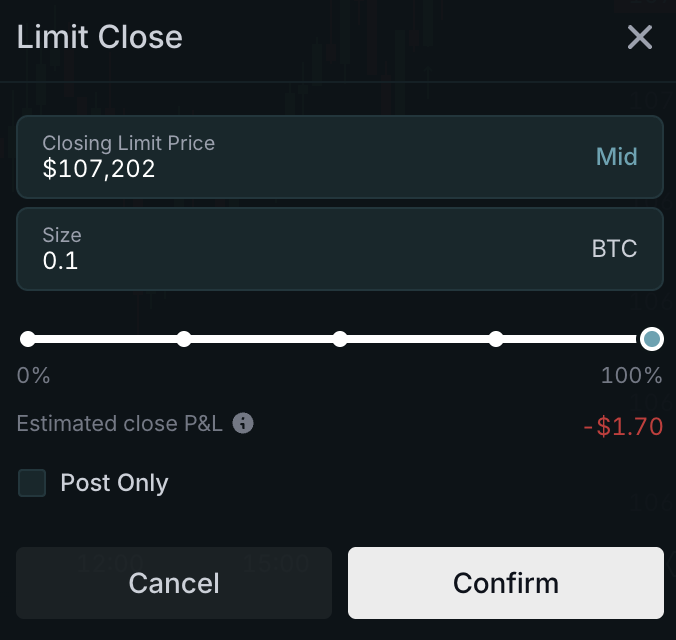
The *Close* button allows you to instantly exit a position partially or in full from the Positions tab. The *Close All* function closes all open positions at once via either market order (default) or limit order at mid-price if selected.

<figure><img src="/files/U24oUGpyeSnn6qSLKsuP" alt=""><figcaption><p>Example of how to close your position with a limit order</p></figcaption></figure>

**Position History**

Track and review trading activity with transparent historical data through the Position History tab.

<figure><img src="/files/Z2RdpFGBJ0l4XBvgL8fG" alt=""><figcaption><p>Example of order fills including size, fill price, fees, and when the fill occurred</p></figcaption></figure>


# Funding Rates

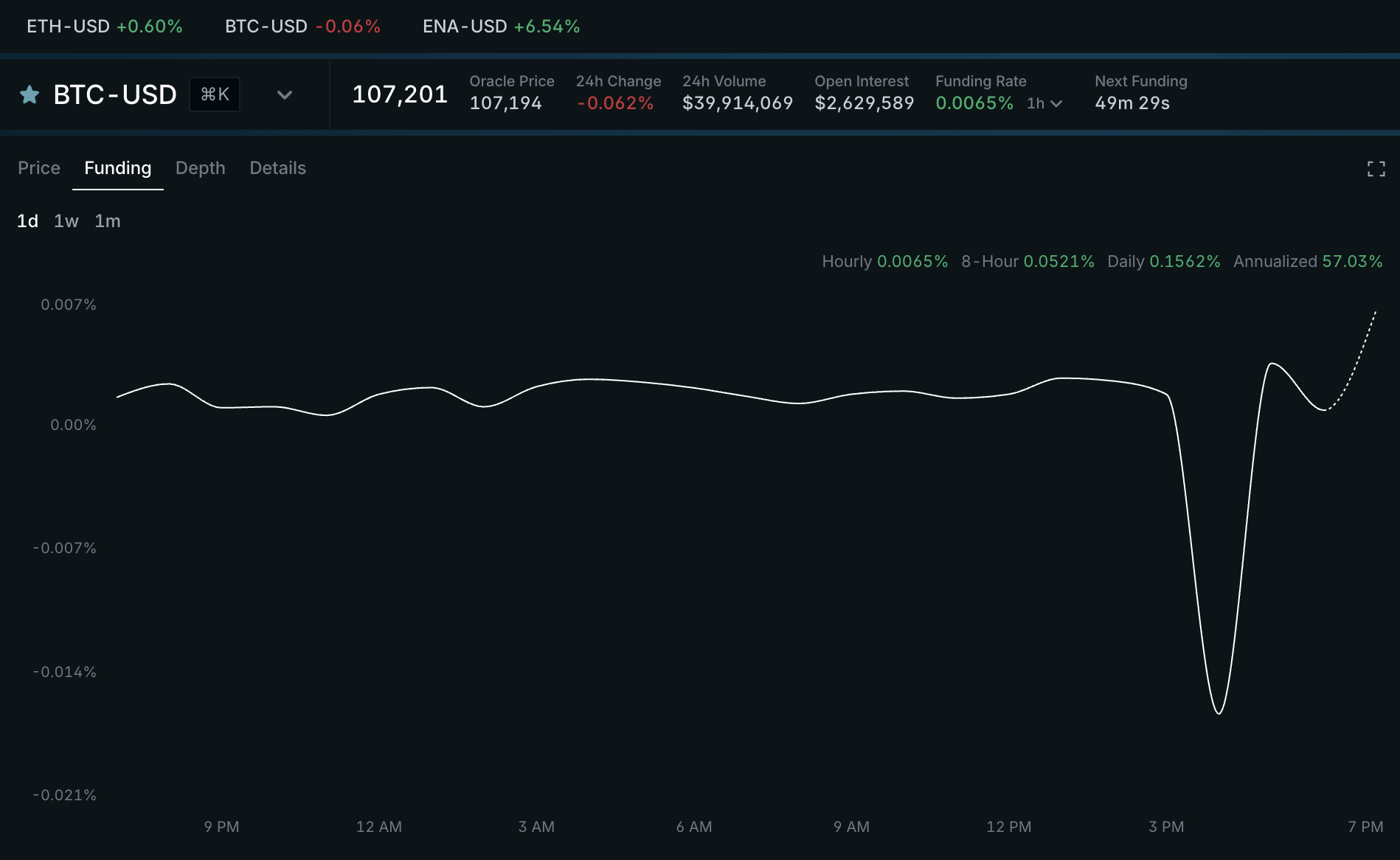
Funding keeps perpetual futures prices anchored to their underlying index prices. When funding is positive, longs pay shorts. When funding is negative, shorts pay longs. Funding is calculated and applied hourly.

Current and historical funding rates are shown in the trading interface and exposed through the Trading API. Funding parameters are market-specific and may change over time.

<figure><img src="/files/T4VAFW0rP8cg15CZOetz" alt=""><figcaption></figcaption></figure>

### Market Parameters

Each perpetual market has funding parameters that define how the rate is calculated.

<table><thead><tr><th width="170.0390625">Parameter</th><th>Description</th></tr></thead><tbody><tr><td><code>bidImpactSizeUsd</code></td><td>USD notional used to calculate the impact bid price from resting bids.</td></tr><tr><td><code>askImpactSizeUsd</code></td><td>USD notional used to calculate the impact ask price from resting asks.</td></tr><tr><td><code>baselineApr</code></td><td>Baseline funding component.</td></tr><tr><td><code>clampApr</code></td><td>Threshold below which the premium component is clamped to zero.</td></tr><tr><td><code>maxApr</code></td><td>Maximum absolute funding rate.</td></tr></tbody></table>

{% hint style="info" %}
Although `bidImpactSizeUsd` and `askImpactSizeUsd` are two separate parameters, in practice they are both always equal.
{% endhint %}

APR parameters are configured as annualized values. The hourly values used in the funding calculation are derived as:

```
hourlyRate = annualizedApr / (365 * 24)
```

These values are part of the market economics. They help traders and market makers estimate expected funding from the live book and index price. The public product API exposes APR fields for each market. Impact sizes are also published below.

#### Current Funding Parameters

<table><thead><tr><th width="138.796875">Market</th><th width="127.86328125" align="right">Impact (Bid)</th><th width="137.2734375" align="right">Impact (Ask)</th><th width="119.921875" align="right">Baseline</th><th width="96.21484375" align="right">Clamp</th><th width="80.37890625" align="right">Max</th></tr></thead><tbody><tr><td>BTCUSD</td><td align="right">60,000</td><td align="right">60,000</td><td align="right">10%</td><td align="right">1%</td><td align="right">200%</td></tr><tr><td>ETHUSD</td><td align="right">35,000</td><td align="right">35,000</td><td align="right">10%</td><td align="right">1%</td><td align="right">200%</td></tr><tr><td>SOLUSD</td><td align="right">5,000</td><td align="right">5,000</td><td align="right">10%</td><td align="right">1%</td><td align="right">95%</td></tr><tr><td>HYPEUSD</td><td align="right">10,000</td><td align="right">10,000</td><td align="right">10%</td><td align="right">1%</td><td align="right">95%</td></tr><tr><td>SUIUSD</td><td align="right">2,500</td><td align="right">2,500</td><td align="right">10%</td><td align="right">1%</td><td align="right">145%</td></tr><tr><td>XRPUSD</td><td align="right">2,500</td><td align="right">2,500</td><td align="right">10%</td><td align="right">1%</td><td align="right">145%</td></tr><tr><td>AAVEUSD</td><td align="right">2,500</td><td align="right">2,500</td><td align="right">10%</td><td align="right">1%</td><td align="right">145%</td></tr><tr><td>ENAUSD</td><td align="right">2,500</td><td align="right">2,500</td><td align="right">10%</td><td align="right">1%</td><td align="right">145%</td></tr><tr><td>FARTCOINUSD</td><td align="right">7,500</td><td align="right">7,500</td><td align="right">10%</td><td align="right">1%</td><td align="right">145%</td></tr><tr><td>PUMPUSD</td><td align="right">5,000</td><td align="right">5,000</td><td align="right">10%</td><td align="right">1%</td><td align="right">145%</td></tr><tr><td>ZECUSD</td><td align="right">5,000</td><td align="right">5,000</td><td align="right">10%</td><td align="right">1%</td><td align="right">200%</td></tr><tr><td>MONUSD</td><td align="right">5,000</td><td align="right">5,000</td><td align="right">10%</td><td align="right">1%</td><td align="right">200%</td></tr><tr><td>XMRUSD</td><td align="right">5,000</td><td align="right">5,000</td><td align="right">10%</td><td align="right">1%</td><td align="right">200%</td></tr><tr><td>LITUSD</td><td align="right">5,000</td><td align="right">5,000</td><td align="right">10%</td><td align="right">1%</td><td align="right">200%</td></tr><tr><td>BERAUSD</td><td align="right">5,000</td><td align="right">5,000</td><td align="right">10%</td><td align="right">1%</td><td align="right">200%</td></tr></tbody></table>

These values are provided for transparency and ***may be updated as market conditions change***.

### Basis Calculation

Funding starts by measuring whether the perpetual market is trading at a premium or discount to the index price. Ethereal uses Pyth Lazer as the external reference price source.

The system samples funding basis throughout each hour. The samples from the previous hour are averaged to produce the funding rate for that interval.

#### Impact Prices

Rather than comparing only the best bid and best ask, funding uses impact prices derived from the order book.

The impact bid and impact ask are calculated from the average execution price for a configured USD notional on each side of the book. Larger impact sizes make the calculation depend on deeper liquidity; smaller impact sizes make it more sensitive to top-of-book liquidity. If there is insufficient usable book data, a basis sample may be skipped for that market.

#### Basis Formula

The basis compares the index price to the impact bid/ask band:

* If the index price is below the impact bid, basis is positive.
* If the index price is above the impact ask, basis is negative.
* If the index price is inside the impact bid/ask band, basis is zero.

Basis is expressed as a rate, not an absolute price difference.

### Hourly Funding Rate

At the start of each hour, the sampled basis values from the previous hour are averaged and converted into an hourly funding rate.

The rate then passes through three market-specific adjustments:

* **Dead zone:** small basis values around zero are clamped to zero, filtering noise from minor deviations.
* **Baseline rate:** a small baseline rate is added. A positive baseline creates a slight bias toward longs paying shorts, which can help incentivize short liquidity provision.
* **Cap:** the final rate is capped to limit extreme funding events.

For positive rates, longs pay shorts. For negative rates, shorts pay longs.

The baseline APR serves as a minimum funding cost and can change over time. Current baseline, clamp, and maximum APR values are listed in the market values table above and exposed by the Trading API through `GET /v1/product`.

The resulting hourly funding rate is then converted into a per-unit USD funding charge using the mark price:

```
chargePerUnitUsd = fundingRate * markPrice
```

Total funding applied to a position depends on the position size and side. Positive funding transfers value from longs to shorts. Negative funding transfers value from shorts to longs.

Funding charges are settled sequentially with other exchange actions. For example, if a funding charge is sequenced before a later trade, the funding charge is processed first.

### **Charge Retries & Edge Cases & Notes**

Funding charges may occasionally fail to apply due to technical reasons. While rare, the exchange will retry the funding charge application for the first 15 seconds of the current hour. If all retry attempts fail, that hour's funding is discarded and not applied retroactively. This ensures the system can handle transient failures while maintaining operational integrity.

Funding is applied once per hour and settled sequentially with other exchange actions. If a funding charge belongs before a later trade in sequence, the funding charge is processed first.


# Market Specifications

All perpetual markets trade 24/7 with no expiry.&#x20;

<table><thead><tr><th width="160.31640625">Ticker</th><th>Tick Size</th><th>Step Size</th><th>Min Order Size</th><th width="177.56640625">Max Order Size</th></tr></thead><tbody><tr><td>BTCUSD</td><td>$1</td><td>0.00001 BTC</td><td>~10 USDe</td><td>25 BTC</td></tr><tr><td>ETHUSD</td><td>$0.1</td><td>0.0001 ETH</td><td>~10 USDe</td><td>500 ETH</td></tr><tr><td>SOLUSD</td><td>$0.01</td><td>0.001 SOL</td><td>~10 USDe</td><td>2,500 SOL</td></tr><tr><td>HYPEUSD</td><td>$0.001</td><td>0.01 HYPE</td><td>~10 USDe</td><td>5,000 HYPE</td></tr><tr><td>SUIUSD</td><td>$0.0001</td><td>0.1 SUI</td><td>~10 USDe</td><td>100,000 SUI</td></tr><tr><td>XRPUSD</td><td>$0.0001</td><td>0.1 XRP</td><td>~10 USDe</td><td>100,000 XRP</td></tr><tr><td>AAVEUSD</td><td>$0.01</td><td>0.001 AAVE</td><td>~10 USDe</td><td>1,000 AAVE</td></tr><tr><td>ENAUSD</td><td>$0.00001</td><td>1 ENA</td><td>~10 USDe</td><td>1,000,000 ENA</td></tr><tr><td>FARTCOINUSD</td><td>$0.00001</td><td>1 FARTCOIN</td><td>~10 USDe</td><td>500,000 FARTCOIN</td></tr><tr><td>PUMPUSD</td><td>$0.0000001</td><td>100 PUMP</td><td>~10 USDe</td><td>50,000,000 PUMP</td></tr><tr><td>ZECUSD</td><td>$0.01</td><td>0.001 ZEC</td><td>~10 USDe</td><td>500 ZEC</td></tr><tr><td>MONUSD</td><td>$0.000001</td><td>10 MON</td><td>~10 USDe</td><td>5,000,000 MON</td></tr><tr><td>XMRUSD</td><td>$0.01</td><td>0.001 XMR</td><td>~10 USDe</td><td>500 XMR</td></tr><tr><td>LITUSD</td><td>$0.0001</td><td>0.1 LIT</td><td>~10 USDe</td><td>100,000 LIT</td></tr><tr><td>BERAUSD</td><td>$0.00001</td><td>1 BERA</td><td>~10 USDe</td><td>300,000 BERA</td></tr><tr><td>DOGEUSD</td><td>$0.00001</td><td>1 DOGE</td><td>~10 USDe</td><td>3,000,000 DOGE</td></tr><tr><td>TONUSD</td><td>$0.0001</td><td>0.1 TON</td><td>~10 USDe</td><td>50,000 TON</td></tr><tr><td>TAOUSD</td><td>$0.01</td><td>0.001 TAO</td><td>~10 USDe</td><td>500 TAO</td></tr></tbody></table>

<table><thead><tr><th>Ticker</th><th>Max Leverage</th><th width="234.76171875">Maintenance Margin Fraction</th><th width="190.98828125">Initial Margin Fraction</th></tr></thead><tbody><tr><td>BTCUSD</td><td>50x</td><td>1%</td><td>2%</td></tr><tr><td>ETHUSD</td><td>50x</td><td>1%</td><td>2%</td></tr><tr><td>SOLUSD</td><td>25x</td><td>2%</td><td>4%</td></tr><tr><td>HYPEUSD</td><td>25x</td><td>2%</td><td>4%</td></tr><tr><td>SUIUSD</td><td>25x</td><td>2%</td><td>4%</td></tr><tr><td>XRPUSD</td><td>25x</td><td>2%</td><td>4%</td></tr><tr><td>AAVEUSD</td><td>10x</td><td>5%</td><td>10%</td></tr><tr><td>ENAUSD</td><td>10x</td><td>5%</td><td>10%</td></tr><tr><td>FARTCOINUSD</td><td>10x</td><td>5%</td><td>10%</td></tr><tr><td>PUMPUSD</td><td>5x</td><td>10%</td><td>20%</td></tr><tr><td>ZECUSD</td><td>10x</td><td>5%</td><td>10%</td></tr><tr><td>MONUSD</td><td>5x</td><td>10%</td><td>20%</td></tr><tr><td>XMRUSD</td><td>10x</td><td>5%</td><td>10%</td></tr><tr><td>LITUSD</td><td>10x</td><td>5%</td><td>10%</td></tr><tr><td>BERAUSD</td><td>5x</td><td>10%</td><td>20%</td></tr><tr><td>DOGEUSD</td><td>10x</td><td>5%</td><td>10%</td></tr><tr><td>TONUSD</td><td>10x</td><td>5%</td><td>10%</td></tr><tr><td>TAOUSD</td><td>5x</td><td>10%</td><td>20%</td></tr></tbody></table>


# Liquidations

Liquidations are automatically triggered when a trader's margin falls below the cumulative maintenance margin requirement across all open positions. This can occur due to mark price updates or funding charges that reduce the account's available margin below the cross-margin threshold.

When a liquidation is triggered, the matching engine performs a complete account takeover, transferring all positions to the liquidator at the bankruptcy price. The liquidator then unwinds these transferred positions over time. This mechanism protects both individual traders and the broader system from cascading insolvency risk.

### **Insurance Fund & Liquidator Account**

The insurance fund is a capital reserve that absorbs any loss that remains after a liquidation.\
The liquidator account is the insurance-fund account itself. All liquidated positions are transferred here and unwound asynchronously. Profits stay in the fund and losses are covered by it.

#### **Core Concepts**

* **Initial margin** – the minimum collateral required to open a position.
* **Maintenance margin** – the minimum equity required to keep positions open.
* **Liquidation price** – the mark price from Pyth Lazer that triggers liquidation.
* **Bankruptcy price cap** – the mark price at which an account’s equity would be exactly zero.

#### **Liquidation Triggers**

The matching engine reevaluates every account at each `MarkPriceUpdate` (once per second) and at every `FundingCharge` event. If equity falls below maintenance margin the account is flagged.

#### **First Bankruptcy Price**

At every oracle update the engine finds the first price at which any account’s equity would hit zero. That price becomes a cap for valuation. If Pyth later prints a deeper price, the cap is used instead, preventing negative equity and limiting damage from stale or bad data.

#### **Liquidation Process**

1. Cancel all open orders on the flagged account.
2. **Full-account takeover – Ethereal does not use partial liquidations.**
3. Transfer every position to the liquidator account at the bankruptcy price.
4. Set the trader’s margin balance to zero and record the action onchain.
5. The liquidator places reduce-only orders to unwind the positions.
   * Surplus PnL is added to the insurance fund.
   * Deficit PnL is covered by the fund.

Liquidations initiated by a funding charge are possible but rare because funding runs hourly and accounts must already be close to maintenance margin.

### **Margin Requirements**

$$
\text{initial\_margin} = \frac{1}{\text{max\_leverage}}
$$

$$
\text{maintenance\_margin} = \frac{1}{2 \times \text{max\_leverage}}
$$

With the default 50× leverage, initial margin is 2 percent and maintenance margin is 1 percent.

#### **Liquidation-Price Calculation**

Account equity equals required margin at liquidation.

#### ***Long Position***

$$
\text{liquidation\_price} = \frac{\text{entry\_price} \times \text{size} - \text{balance}}{(1 - \text{maintenance\_margin}) \times \text{size}}
$$

*Example* – balance 10k USD, long 1 BTC at entry 83k, maintenance 1%\
Liquidation price = (83000 - 10000) / 0.99 = **73737**

#### ***Short Position***

$$
\text{liquidation\_price} = \frac{\text{entry\_price} \times \text{size\_abs} + \text{balance}}{(1 + \text{maintenance\_margin}) \times \text{size\_abs}}
$$

*Example* – balance 10k, short 1 BTC at entry 65, maintenance 1%\
Liquidation price = (65000 + 10000) / 1.01 = **74257**

{% hint style="info" %}
`balance` is continuously adjusted for fees, funding and unrealised PnL.
{% endhint %}

### **Onchain Verification**

A `LiquidateSubaccount` action is submitted to the `ExchangeGateway`. Smart contracts:

1. Check that the mark price is recent (not older than the staleness tolerance).
2. Confirm positions and sizes match the engine output.
3. Recompute equity with the verified oracle price and ensure it is below maintenance margin.

If any check fails the transaction reverts and the liquidation is cancelled.


# Auto Deleveraging

ADL is a last-resort feature that is activated only if the insurance fund’s equity falls to zero (its *bankruptcy price*) and the liquidator therefore cannot cover the deficit.

1. **Trigger** – When a liquidation would leave the insurance fund insolvent, ADL begins.
2. **Order-book sweep** – All open orders on the insurance-fund account are first cancelled.
3. **Counterparty ranking** – Accounts holding *opposite* positions are ranked in strict priority:
   1. Highest effective leverage
   2. Highest unrealised PnL
   3. Lowest account balance
   4. Newest account (higher account number)
4. **Forced position closure** – Starting from the top of the list, the engine closes just enough of each profitable position against the insurance fund at the current oracle mark (capped at the bankruptcy price) to offset the shortfall.
5. **No intermediate checks** – Once ADL starts it runs to completion even if the fund would briefly become solvent part-way through. When the insurance fund’s equity is ≥ 0 and it holds no positions, ADL stops.

***

**Example – ETH long unwound via ADL**

* Trader A is long 10 ETH from $4000.
* ETH crashes to $3600. A’s equity is now –$2000.
* The insurance fund has already reached its bankruptcy price, so it cannot absorb the loss – ADL triggers.
* The system ranks profitable shorts; Trader B is first on the list.
* The engine closes enough of B’s short at $3600 to transfer $2000 of PnL.
* Result: Trader A’s position is fully closed, Trader B’s short is partially reduced, the insurance fund carries zero bad debt, and trading continues.


# Subaccounts

Subaccounts are isolated trading environments within the exchange that allow users to separate their trading positions, margin, and risk profiles. Each subaccount operates independently, preventing cross-contamination of risk between different trading strategies or markets.

Each subaccount contains its own isolated margin balance, maintains separate positions across markets, and has independent liquidation thresholds. Critically, subaccounts cannot impact other subaccounts, even those owned by the same user. This isolation ensures that negative performance in one trading strategy or market cannot affect positions in other subaccounts.

### **Purpose and Benefits**

Subaccounts provide essential functionality for traders. They enable *risk isolation* by preventing cascading liquidations across different trading strategies. Traders can implement multiple strategies with different risk profiles through *strategy separation*, while maintaining *portfolio organization* with clear segregation between different trading purposes.

The system also provides *accounting clarity* by simplifying profit/loss tracking for different trading approaches, and facilitates *API integration* by allowing different systems to operate on isolated accounts. Without subaccounts, all positions would share the same margin pool, meaning a losing position in one market could force liquidation of profitable positions in other markets.

### **System Accounts**

System accounts are special-purpose accounts maintained by Ethereal to handle essential platform operations. Unlike standard user accounts, system accounts operate with elevated permissions and are exclusively used by the exchange.

Some system accounts are also subaccounts. The *fee collector* automatically receives all trading fees generated on the platform, while the *liquidator* receives all position transfers upon liquidation. There are also non-subaccount system accounts such as the exchange contract owner and sequencer.

System accounts must be unregistered when the role is granted. This safeguard prevents the protocol from assigning a system role—with its associated restrictions and liabilities—to a user account.


# Price Oracles

Oracle prices serve as trusted external data sources that bring real-world market information into blockchain and DeFi applications. In traditional financial markets, pricing data is readily available from centralized exchanges.&#x20;

Oracles solve this problem by aggregating price data from multiple sources, validating and filtering outliers, providing cryptographic proof of data integrity, and delivering consistent pricing information to smart contracts and trading systems. Accurate and reliable price feeds are fundamental to numerous DeFi operations, including lending protocols, derivatives platforms, and automated market makers.

### **Oracle Provider**

Ethereal utilizes *Pyth Lazer* as its oracle provider. Pyth Lazer delivers high-quality, low-latency price feeds that power critical functions across our trading infrastructure. You can learn more about Pyth Lazer by visiting their site or reading their documentation.

{% hint style="info" %}
You can find Pyth Lazer smart contracts for testnet and mainnet [here](https://docs.pyth.network/price-feeds/pro/contract-addresses).
{% endhint %}

### **Oracle Price Applications**

Oracle prices from Pyth Lazer serve two primary functions within Ethereal.

#### *Mark Price Determination*

Mark prices derived from oracle feeds play a crucial role in our risk management system. An offchain price feed stream consumer subscribes to price updates emitted from Pyth Lazer, and these oracle prices are periodically pushed into our matching engine.

When a new mark price enters the system, it triggers position risk calculations across all active positions. Each update evaluates which positions are at risk for liquidation based on maintenance margin requirements, with positions falling below required margins flagged for potential liquidation.

These mark prices are tracked and subsequently used for price verification onchain, validating maintenance margin requirements during liquidation settlement. This ensures liquidations occur fairly and only when warranted by actual market conditions. For more detailed information about how mark prices factor into liquidation processes, see our Liquidations documentation.

#### *Funding Rate Calculations*

Oracle prices are essential for calculating funding rates on our perpetual exchange. Funding rates require an accurate benchmark to determine the premium or discount of perpetual contract prices. Pyth Lazer provides the spot price reference used in our basis calculations, with measurements collected throughout the hour and averaged to determine funding payments between long and short position holders.

This mechanism ensures perpetual contract prices remain anchored to the underlying spot market, maintaining market integrity and preventing price manipulation. For comprehensive details on how oracle prices factor into our funding rate mechanism, see our Funding Rates documentation.


# Self Trade Prevention

Self Trade Prevention (STP) is a mechanism that prevents a user's orders from matching against their own orders in the order book. This can occur when a user has multiple active orders on both sides of the book, or when an automated trading strategy submits an order that would inadvertently fill against an existing resting order from the same subaccount.

When STP is triggered, the resting (maker) order is canceled. The incoming (taker) order remains active and can continue to match against other orders in the book. The canceled resting order will have the result code `MakerCanceledByTaker`. STP is always enabled and cannot be disabled.

### Example

1. Account A places a sell limit order at $100 (resting in the book)
2. Account A places a buy market order that would match at $100
3. Instead of trading against itself, the resting sell order is canceled
4. The buy order continues and matches against other sellers in the book

### Behavior With Order Types

STP applies regardless of order type. Some notable interactions:

* **Post-only**: A post-only order that would rest and later be matched by an aggressing order from the same account, the resting post-only order is canceled.
* **Fill or Kill**: If the only available liquidity is the same account's resting orders, the FOK order is unfilled
* **Reduce-only / Close**: Resting reduce-only or close orders are canceled if the same account aggresses against them
* **Stop orders**: If a triggered stop order would match a resting order from the same account, the resting order is canceled
* **OCO / OTO**: Contingent orders follow the same rules. if one leg is canceled due to STP, contingency behavior applies as normal

### API Considerations

Since STP prevents self-matches from executing, no fill or trade record is produced when a resting order is canceled due to STP.

When STP is triggered during order submission, the response for the aggressing (taker) order will indicate a successful submission, the taker order is not rejected. The resting (maker) order is canceled asynchronously with the result code `MakerCanceledByTaker`.

#### Block Executions Interplay

Orders submitted during a block window are held internally with a status of `PENDING` until the block is released. STP is evaluated when the block is processed.

If an aggressing order in a block would match against a resting order from the same subaccount, the resting order is canceled as part of the same block. This means a resting order can be canceled by STP before the aggressing order even becomes active.

In this scenario, the resting order's lifecycle is `NEW` to `CANCELED` with the result code `MakerCanceledByTaker`, and the aggressing order transitions from `PENDING`  to `NEW` - both occurring atomically within the same block.

Read more on [Block Execution](/trading/perpetual-futures/block-execution).

### FAQ

**Can I disable STP?**

No. STP is always enabled to ensure market integrity.

**Does STP apply across different subaccounts on the same account?**

No. STP only applies within the same subaccount. Orders from different subaccounts on the same account can match against each other.

**Are there any fees when STP cancels an order?**

No. Since no trade occurs, no fees are charged.


# Block Execution

## Overview

Ethereal uses block execution with **post + cancel prioritization** to promote fair and efficient markets.

### How It Works

When the sequencer receives an order, it is either 1) held in **queue** until the end of the block (taker orders), or 2) immediately included (post or cancel orders).&#x20;

At the end of the block, the block is processed and all held orders are matched against the order book.

{% hint style="info" %}
Orders within a block are currently processed in the order they were received (FIFO). In the future, in-block ordering may be randomized to further reduce any advantage from submission timing within a block.
{% endhint %}

#### Post + Cancel Prioritisation

<table><thead><tr><th width="243.171875">Order type</th><th>Behavior</th></tr></thead><tbody><tr><td><strong>Post (maker) orders</strong></td><td>Bypass the block for immediate inclusion</td></tr><tr><td><strong>Cancel of a resting order</strong></td><td>Bypass the block for immediate inclusion</td></tr><tr><td><strong>Cancel of an in-flight order</strong></td><td>Joins the same block as the order being canceled</td></tr><tr><td><strong>Taker orders</strong></td><td>Held in the block until the end of the block </td></tr></tbody></table>

### Why Block Execution?

Block execution reduces adverse selection risk and encourages tighter spreads and deeper liquidity:

* **Tighter spreads and deeper liquidity:** makers quote tighter and larger under less threat of adverse selection or latency arbitrage. &#x20;
* **Fair access:** takers submitting within the same block are treated equally regardless of connection speed.
* **Lower barriers:** longer tail makers can participate without investing in ultra-low-latency infrastructure.

{% hint style="info" %}
Block execution is applied uniformly across all perpetual futures markets. There is no per-market configuration - all markets share a single block cadence, which ensures consistent behavior and allows features like OCO orders to work atomically across markets.
{% endhint %}

### Pre-block Execution vs. Post-block Execution

{% hint style="warning" %}
The following are user-facing behavioral changes introduced by block execution that differ from the previous (non-block) flow. Integrators should update their clients accordingly.
{% endhint %}

#### Cancel Status For in-block Orders

When a cancel targets an order that entered the current block (i.e. a taker order that has not yet been flushed), **the cancel is placed into the same block** rather than executing immediately. Because the cancel is accepted into the block, the HTTP response returns an `OK`  status. However, the cancel may ultimately be rejected when the block is flushed, for example, if the target taker order was fully filled during block processing, there is nothing left to cancel and the engine will reject the cancellation.

Cancels targeting resting orders on the book continue to bypass the block and resolve synchronously as before. **This change only affects cancels against orders that are still pending inside a block.** The `OK` status in that case only confirms that the cancel was accepted into the block, not that it will succeed. Integrators should treat the cancel response as optimistic and listen to WebSocket order acknowledgements to confirm whether the order was actually canceled or whether the cancel was rejected post-flush.

#### Filled Quantity is Always Zero on Submit Response

Previously, submitting a taker order could return a non-zero `filled` value in the HTTP response, reflecting the quantity matched at submission time. With block execution enabled, all taker orders are held in the block and matching occurs only when the block is flushed. As a result, the `filled` field in the immediate submit response will always be `0`.&#x20;

To obtain the actual fill quantity, integrators must listen to the WebSocket order fill feed. Fill information will arrive as order update messages once the block has been processed and matching is complete.

### FAQ

**Can I see if my order is in a block?**

No. There is no pending status on the websocket feed. Your order will appear as filled or acknowledged after the block is processed.

**What about OCO (one-cancels-the-other) orders?**

OCO groups work correctly because all markets share the same block schedule. Both legs of an OCO will always be in the same block, so atomic cancellation is guaranteed.

**Do blocks have a fixed duration?**

Not exactly. A small random jitter is added to each block to prevent participants from timing the block boundary

**Can I cancel an in-flight order?**

Yes, but the cancel will join the same block rather than executing immediately. Cancels only bypass the block when targeting a resting order on the book.

**How are stop orders handled during block execution?**

Stop orders are risk-management orders, so once registered they can trigger immediately on later mark updates to help reduce losses and avoid liquidation. However, a stop submitted during the current block cannot be triggered by a mark update in that same block; it remains dormant until the block completes. This prevents traders from using fresh mark-price information to submit stops that effectively bypass block execution.


# Referrals

Mainnet Alpha users can now generate Ethereal access codes to refer friends and earn rewards.

Earn 10% of all points your referrals generate. This applies to all point-generating activity: trading, deposits, and their referrals.

Visit [app.ethereal.trade/points](https://app.ethereal.trade/points) to generate your access codes and track referral activity.

Have a community of active traders who need access? The [Ethereal Ambassador Program](https://tally.so/r/3Ep8W2) provides additional codes for trading communities.


# Ethereal Testnet

## Overview

The Ethereal testnet can be accessed at <https://testnet.ethereal.trade>. Community feedback is **actively encouraged.** The best way to engage with the community is through the Ethereal Discord where users and community members help shape the project's development and roadmap.&#x20;

### **Wallet Setup**

To access the testnet, you'll need an EVM-compatible wallet such as Rabby, MetaMask, Phantom, or Coinbase Wallet. We recommend creating a dedicated wallet specifically for testing purposes and ensuring you securely back up your private key before proceeding.

If you aren't automatically prompted by your wallet to add the Ethereal network, you can manually add the Ethereal testnet to your wallet with these settings:

```
RPC: https://rpc.etherealtest.net
Chain ID: 13374202
Gas Token: USDe
Decimals: 18
Explorer: https://explorer.etherealtest.net/
```

### **Support**

For questions, feedback, or bug reports, join the Ethereal [discord server](https://discord.gg/etherealdex)!

{% hint style="info" %}
Reach out to a team member Discord in #developer-support and we can provide testnet funds for development/testing. Ethereal does not currently provide a public testnet faucet.
{% endhint %}


# Market Making

Coming soon.


# USDe Balance Rewards

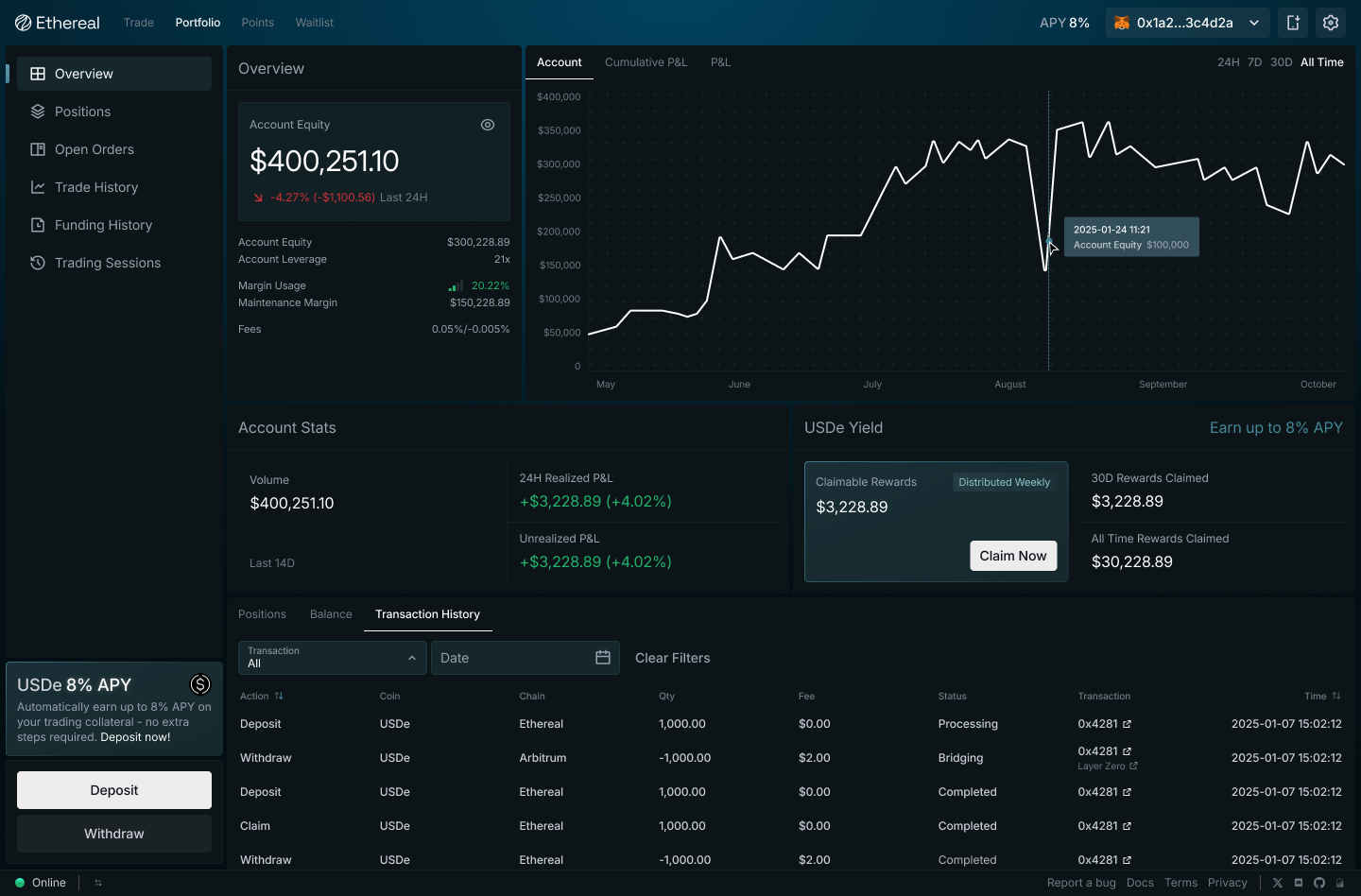
All users on Ethereal automatically earn native USDe rewards on their full margin balance powered by Ethena.&#x20;

#### **How it works**

Snapshots of each subaccount’s USDe balance are taken periodically throughout each week and transformed into an aggregated average balance. Rewards are distributed via [Merkl](https://app.merkl.xyz/) according to each user's full account equity (with no haircuts applied or debt accrued on unrealized PnL).&#x20;

<figure><img src="/files/9AvVYCHFYry9LwyonSBl" alt=""><figcaption></figcaption></figure>


# USDe Trading Rewards

The USDe Trading Rewards program is designed to improve the economics for holding positions on Ethereal by directing a portion of exchange fees back to users based on their contribution to global OI.&#x20;

Each week, up to 25% of exchange fees are automatically routed to the USDe Trading Rewards pool and distributed pro rata to users based on their average share of total OI during the rewards period. Total Rewards are capped at a 27.1828% APR (including USDe Balance and Trading rewards) based on a user's average margin balance for the period.&#x20;

USDe Trading Rewards are distributed on a 7 day delay alongside USDe Balance Rewards distributions. The snapshot period for average balance and OI is taken each week on Wednesday at 23:59 UTC for the prior 7 days.&#x20;

There is no enrollment requirement. All positions long or short automatically qualify once they have been held for a minimum of 1 hour. Note that opening offsetting positions across multiple Ethereal accounts with clear intent to game the rewards process may result in exclusion from the program.&#x20;

**Example**&#x20;

* Weekly protocol trading fees: $93,600
* OI rewards pool (25% of fees): $23,400
* Total platform OI: $21,530,000
* Your average OI: $40,000
* Your average margin: $10,000

```
OI Rewards Pool = $93,600 × 0.25 = $23,400
User OI Share = $40,000 ÷ $21,530,000 = 0.186%
User Reward = $23,400 × 0.00186 = $43.52

User APR = ($43.52 × 52) ÷ $10,000 = 22.63%
Cap = 27.1828%
```

**FAQ**

Do positions across different markets count?&#x20;

* Yes. Total OI is calculated as the sum of all open positions across all markets.

Why didn't my new deposit increase my rewards?&#x20;

* Rewards are calculated using your average balance over the 7-day snapshot period (Wednesday 23:59 UTC to Wednesday 23:59 UTC). Deposits made mid-period only factor into the average proportionally based on time held.

Does opening a position for 1 hour qualify for full rewards?&#x20;

* The 1-hour minimum is the threshold before a position begins accruing rewards. Distribution is based on your average OI for the period.

What is the 27.1828% APR cap?&#x20;

* Individual accounts cannot earn more than 27.1828% APR on their average margin balance across all USDe rewards (Balance + Trading). If your calculated reward exceeds this cap, the final distribution is reduced to the capped amount.

How does the 7-day delay work?&#x20;

* Rewards are distributed one week after the period ends on Thursday for both USDe Balance & USDe Trading rewards. The rewards you receive each week are based on prior week's activity.&#x20;


# Rewards & Points

Ethereal users automatically earn multiple rewards just by trading and holding USDe margin on the exchange. Rewards are broken down into multiple categories:

**USDe Rewards:** All USDe balances on Ethereal earn [USDe Balance Rewards](https://docs.ethereal.trade/trading/usde-balance-rewards) continuously at a rate denoted by Balance APR. These rewards accrue on your Ethereal account balance, with or without open positions. All positions held for a minimum of 1 hour qualify for [USDe Trading Rewards](https://docs.ethereal.trade/trading/usde-trading-rewards), distributed pro rata based on your share of total open interest (OI) each week and denoted by Trading APR. Total Rewards (Balance Rewards + Trading Rewards) are capped at 27.1828% APR based on your average margin balance each week. All USDe rewards are distributed weekly.&#x20;

![](/files/n5B77bhk5bI00UXtkyAZ)

**Ethereal Points**: All authentic trading activity on Ethereal earns Ethereal Points. Multiple factors are considered in points calculations, including fees paid, open interest, liquidations, maker/taker volume, and referrals. Snapshots are taken Wednesdays at 23:59 UTC and points are distributed weekly on Fridays.&#x20;

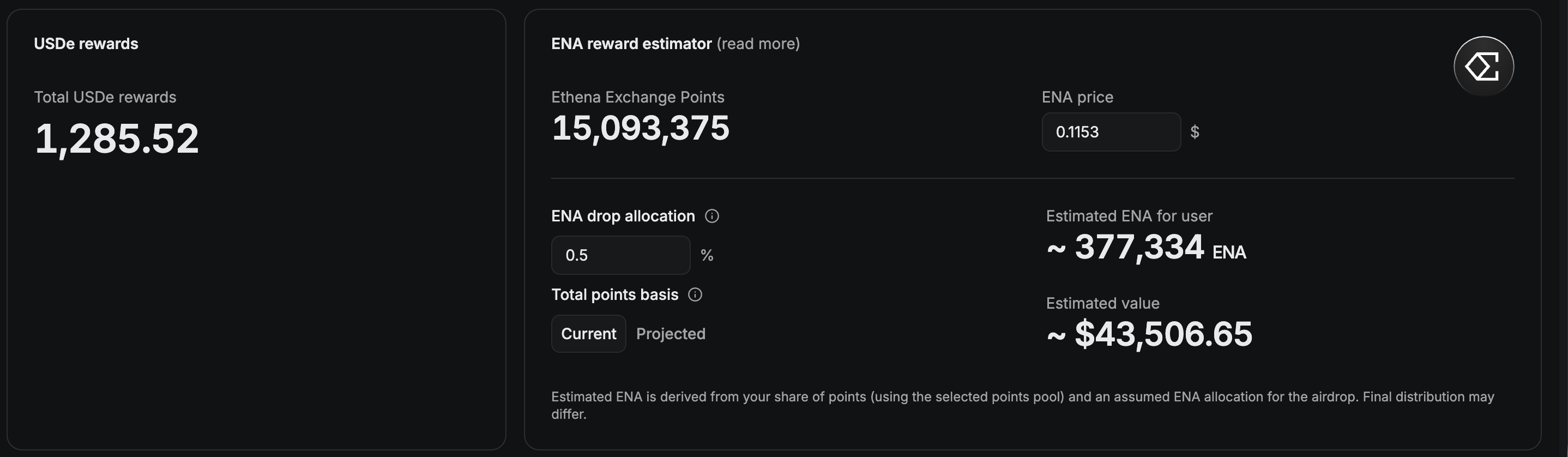
**ENA Distribution**: On top of ETHEREAL Points, authentic trading activity also earns Ethena Exchange Points, which will convert into ENA at the end of the program. [Learn more](https://blog.ethereal.trade/ethena-exchange-points)

For a detailed breakdown of your estimated points and rewards across all programs, check out this [community tool built by @HedgeHog](https://ethereal.thehedgie.com/).

<figure><img src="/files/WwzC5qUlCFF5vvSn2yLg" alt=""><figcaption></figcaption></figure>

<br>


# Trading API


# Quick Start

This quickstart describes how to make your first deposit, set up the Python SDK, and make your first request.

## Initial Setup

1. **Make your first deposit** - [Deposit USDe to start trading](/developer-guides/trading-api/token-transfers)
2. **Understand message signing** - [Authentication through signed EIP712 messages](/developer-guides/trading-api/message-signing)
3. **Setup your development environment** - [Configure hosts](/protocol-reference/api-hosts), download the [Python SDK](/developer-guides/sdk/python-sdk), and read through the API reference&#x20;

The best way to get familiar with Ethereal is to RTFM and dive into the code. See links above for the Trading API and Python SDK to get started!


# Message Signing

## Overview

When interacting with the Ethereal exchange, many operations like trading and account management require cryptographic signatures to authenticate and authorize your actions.

### Why Sign Messages?

The trading API uses cryptographic signatures for authentication instead of traditional JSON Web Tokens (JWTs). When making an API request, rather than including a JWT obtained from a centralized authentication service, **the requesting client signs an EIP-712 structured message using their private key**. The signature proves the client's identity and authorizes them to access the endpoint.

Majority of endpoints are read-only public facing. However, for endpoints that mutate data such as order placement and cancelations, these calls are authenticated and authorised via signatures in the form of EIP-712 messages (<https://eips.ethereum.org/EIPS/eip-712>).

*Each authenticated endpoint requires a different message type to sign*. Ethereal has a few message types including: `LinkSigner`, `RevokeLinkedSigner`, `RefreshLinkedSigner`, `ExtendLinkedSigner`, `EIP712Auth`, `InitiateWithdraw`, `TradeOrder` , and `CancelOrder`. Once a signature is created, they are sent along with the rest of the HTTP payload, validated, stored, and the relayer batches these operations onchain at a later time.

### Signature Types and Domain

Message signing is one of the trickier parts of integrating with the API. It sits at the boundary between onchain message structures and the HTTP API. The `/v1/rpc/config` endpoint provides the EIP-712 domain and type definitions you need to get started.

```bash
curl -X 'GET' \
  'https://api.ethereal.trade/v1/rpc/config' \
  -H 'accept: application/json'
```

```json
{
  "domain": {
    "name": "Ethereal",
    "version": "1",
    "chainId": 5064014,
    "verifyingContract": "0xB3cDC82035C495c484C9fF11eD5f3Ff6d342e3cc"
  },
  "signatureTypes": {
    "LinkSigner": "address sender,address signer,bytes32 subaccount,uint64 nonce,uint64 signedAt",
    "TradeOrder": "address sender,bytes32 subaccount,uint128 quantity,uint128 price,bool reduceOnly,uint8 side,uint8 engineType,uint32 productId,uint64 nonce,uint64 signedAt",
    "InitiateWithdraw": "address account,bytes32 subaccount,address token,uint256 amount,uint64 nonce,uint64 signedAt,bytes32 destinationAddress,uint32 destinationEndpointId",
    "RevokeLinkedSigner": "address sender,address signer,bytes32 subaccount,uint64 nonce,uint64 signedAt",
    "EIP712Auth": "address sender,uint8 intent,uint64 signedAt",
    "CancelOrder": "address sender,bytes32 subaccount,uint64 nonce",
    "RefreshLinkedSigner": "address sender,address signer,uint64 nonce,uint64 signedAt",
    "ExtendLinkedSigner": "address sender,uint64 nonce,uint64 signedAt"
  }
}
```

{% hint style="warning" %}
This configuration may not reflect the current state. Query the live API endpoint `/v1/rpc/config` to retrieve the latest version.
{% endhint %}

There are 2 components to this response: **domain** and **signatureTypes**.

### Domain

The `domain` object provides context for the signed message and helps prevent cross-application replay attacks. It includes:

* `name`: The name of the signing application or protocol (e.g., "Ethereal")
* `version`: The current version of the contract/application
* `chainId`: The chain ID where the signature is valid
* `verifyingContract`: The address of the contract that will verify the signature

This domain information creates a unique context for each application, ensuring that signatures created for one application cannot be reused in another.

### Signature Types

The `signatureTypes`, `messageTypes` (or `types`) defines the structure of the data being signed. It's an object containing named structures with their respective fields and types. In the example above, `LinkSigner` has the following shape:

```
address sender,address signer,bytes32 subaccount,uint64 nonce,uint64 signedAt
```

Which, when parsed gives the following:

```typescript
[
    { name: 'sender', type: 'address' },
    { name: 'signer', type: 'address' },
    { name: 'subaccount', type: 'bytes32' },
    { name: 'nonce', type: 'uint64' },
    { name: 'signedAt', type: 'uint64' },
]
```

### What is a `nonce`?

Every message type includes a `uint64 nonce`. On Ethereal, the nonce functions as a uniqueness parameter that prevents replay attacks by ensuring each signed message can only be processed once. Unlike traditional implementations using sequential counters, Ethereal uses the current timestamp in nanoseconds, providing a high-precision identifier that guarantees no two legitimate transactions will share the same nonce, even when submitted rapidly.

When signing orders or executing operations, this nanosecond timestamp becomes part of the signed data structure. The exchange validates each signature by verifying the timestamp is within an acceptable window and hasn't been previously processed, automatically rejecting any attempt to reuse a signature. This approach supports high-frequency trading without compromising security, as users can generate multiple valid signatures quickly without tracking on-chain state changes.

To generate a nonce, we recommend simply just retrieving the current time in nanoseconds and adding some randomness at the end of the timestamp.

### Message Expiry via `signedAt`

Message nonces are tracked to prevent reuse. Each signed message includes a timestamp (`signedAt`) that the exchange validates against a tolerance window. If the message is too old, it is rejected regardless of whether the signature is otherwise valid. This prevents replay attacks over extended periods, even if a previously signed message is intercepted.

For operations that are batched and verified onchain, the `nonce` provides an additional layer of protection during the delay between signing and onchain confirmation.

### Walkthrough

Below is a TypeScript guide with concrete examples on how to sign messages. The examples below use [viem](https://viem.sh/) as the only dependency. All snippets are self-contained TypeScript that should be able run with `ts-node` or any bundler.

#### Prerequisites

Before signing any message, you need two things: a wallet and the EIP-712 domain.

{% code overflow="wrap" %}

```typescript
import { createWalletClient, http, parseUnits, toHex, type Hex } from "viem";
import { privateKeyToAccount } from "viem/accounts";

const API_BASE = "https://api.ethereal.trade/v1";

const account = privateKeyToAccount("0xYOUR_PRIVATE_KEY" as Hex);
const walletClient = createWalletClient({ account, transport: http() });
```

{% endcode %}

Fetch the domain once and reuse it for all subsequent signatures. It only changes if the exchange migrates to a new contract.

{% code overflow="wrap" %}

```typescript
const fetchDomain = async () => {
 const res = await fetch(`${API_BASE}/rpc/config`);
 const { domain } = await res.json();
 return domain as {
   name: string;
   version: string;
   chainId: number;
   verifyingContract: Hex;
 };
};

const domain = await fetchDomain();
```

{% endcode %}

#### Message Timings: `nonce` and `signedAt`&#x20;

Every signed message includes timing fields. These serve different purposes and use different units. Mixing them up is one of the most common integration mistakes.

* `nonce` nanoseconds since Unix Epoch. Used for replay protection and uniqueness. Sent as a string because nanosecond timestamps exceed JavaScript's safe integer range.
* `signedAt` seconds since Unix Epoch. Used to check message freshness. Sent as a number.

Both are validated against the server's clock: `nonce` **must be within 1 hour**, and `signedAt` **must be within 1 hour in the past and 10 seconds in the future**.

#### Subaccount `name` Encoding

Subaccounts are identified by a `bytes32` value. This is most likely a UTF-8 name right-padded with zeros to 32 bytes. If you made a deposit on app.ethereal.trade, the default subaccount name is "`primary`". Read through [Subaccounts](/trading/perpetual-futures/subaccounts) if you are unfamiliar with subaccounts on Ethereal.

{% code overflow="wrap" %}

```typescript
// "primary" is "0x7072696d61727900000000000000000000000000000000000000000000000000"
```

{% endcode %}

#### Decimal Precision

All quantities and prices on Ethereal use **9 decimal places of precision**. The API request body accepts human-readable decimal strings like "5.5", but the EIP-712 signed message requires the raw `bigint` representation.

{% hint style="info" %}
A common mistake is using 18 decimals (ETH wei). Ethereal uses 9.
{% endhint %}

{% code overflow="wrap" %}

```typescript
 const toGwei = (decimal: string): bigint => parseUnits(decimal, 9);

 // "5.5"    -> 5500000000n
 // "4200.5" -> 4200500000000n
```

{% endcode %}

{% hint style="warning" %}
Always derive both the signed `bigint` value and the request body's decimal string from the same source of truth. Floating-point arithmetic in most languages introduces tiny rounding errors (e.g., `0.1 + 0.2` producing `0.30000000000000004`).\
\
If your price or quantity string has trailing noise like `"5.500000000000000003"`, it will not match the `bigint` value you signed, and the server will return a 401.\
\
**The safest approach is to work with string representations throughout and avoid intermediate floating-point math entirely.**
{% endhint %}

#### Order Placement/Cancelation

Order placement is the most common signing operation. The signed message type is `TradeOrder`, and the EIP-712 type definition looks like this:

{% code overflow="wrap" %}

```typescript
const Types = {
 TradeOrder: [
   { name: "sender", type: "address" },
   { name: "subaccount", type: "bytes32" },
   { name: "quantity", type: "uint256" },
   { name: "price", type: "uint256" },
   { name: "reduceOnly", type: "bool" },
   { name: "side", type: "uint8" },
   { name: "engineType", type: "uint8" },
   { name: "productId", type: "uint32" },
   { name: "nonce", type: "uint64" },
   { name: "signedAt", type: "uint64" },
 ],
} as const;
```

{% endcode %}

{% hint style="info" %}
The type definitions here are hardcoded for clarity. You can also parse them dynamically from the `signatureTypes` field in the `/v1/rpc/config` response.
{% endhint %}

{% hint style="info" %}
The `side` and `engineType` fields are numeric enums. `side=0=Buy`, `side=1=Sell`, `engineType=0=Perp`, `engineType=1=Spot`. As of writing Ethereal only supports `engineType=0`.
{% endhint %}

To place a ***limit order***, sign the `TradeOrder` message with the desired `price` and `quantity`, then send it alongside the order details in the request body.

A few important differences between the signed message and the request body to be aware of:

* `productId` in the signature corresponds to `onchainId` in the body
  * You can find out a product's `onchainId` by listing products via the REST API
* `price` and `quantity` are bigint values in the signature but decimal strings in the body
* `nonce` is a `bigint` in the signature *but a string in the body*
* `signedAt` is a `bigint` in the signature *but a number in the body*

{% code overflow="wrap" expandable="true" %}

```typescript
const placeLimitOrder = async () => {
 const nonce = getNonce();
 const signedAt = getSignedAt();
 const subaccount = encodeSubaccount("primary");

 const signature = await walletClient.signTypedData({
   account,
   domain,
   types,
   primaryType: "TradeOrder",
   message: {
     sender: account.address,
     subaccount,
     quantity: toGwei("5.5"),
     price: toGwei("4200.5"),
     reduceOnly: false,
     side: 0, // BUY
     engineType: 0, // PERP
     productId: 1, // 1=BTCUSD
     nonce,
     signedAt: BigInt(signedAt),
   },
 });

 const res = await fetch(`${API_BASE}/order`, {
   method: "POST",
   headers: { "Content-Type": "application/json" },
   body: JSON.stringify({
     data: {
       sender: account.address,
       subaccount,
       quantity: "5.5",
       price: "4200.5",
       reduceOnly: false,
       side: 0,
       engineType: 0,
       onchainId: 1,
       type: "LIMIT",
       timeInForce: "GTD",
       postOnly: false,
       nonce: nonce.toString(),
       signedAt,
     },
     signature,
   }),
 });

 return res.json();
};
```

{% endcode %}

***Market orders*** use the same `TradeOrder` signature type, but with **one critical difference**: the `price` must be `0n` (zero) in the signed message. In the request body, set type: "`MARKET`" and omit the `price` field entirely.

{% code overflow="wrap" expandable="true" %}

```typescript
 const placeMarketOrder = async () => {
   const nonce = getNonce();
   const signedAt = getSignedAt();
   const subaccount = encodeSubaccount("primary");

   const signature = await walletClient.signTypedData({
     account,
     domain,
     types,
     primaryType: "TradeOrder",
     message: {
       sender: account.address,
       subaccount,
       quantity: toGwei("5.5"),
       price: 0n, // Must be 0 for market orders
       reduceOnly: false,
       side: 0, // BUY
       engineType: 0, // PERP
       productId: 1, // 1=BTCUSD
       nonce,
       signedAt: BigInt(signedAt),
     },
   });

   const res = await fetch(`${API_BASE}/order`, {
     method: "POST",
     headers: { "Content-Type": "application/json" },
     body: JSON.stringify({
       data: {
         sender: account.address,
         subaccount,
         quantity: "5.5",
         // no price field for market orders
         reduceOnly: false,
         side: 0,
         engineType: 0,
         onchainId: 1,
         type: "MARKET",
         nonce: nonce.toString(),
         signedAt,
       },
       signature,
     }),
   });

   return res.json();
 };
```

{% endcode %}

{% hint style="info" %}
Signing a market order with a non-zero price is one of the most common causes of 4xx errors. The signature will not match what the server expects.
{% endhint %}

The `CancelOrder` signature is simpler than `TradeOrder`. It only requires the `sender`, `subaccount`, and `nonce`. The specific orders to cancel are listed in the request body, *not in the signed message*. This means a single signature can cancel up to **200 orders** at once.

{% code overflow="wrap" expandable="true" %}

```typescript
const Types = {
  CancelOrder: [
    { name: "sender", type: "address" },
    { name: "subaccount", type: "bytes32" },
    { name: "nonce", type: "uint64" },
  ],
} as const;
```

{% endcode %}

You can specify orders an API assigned UUID via `orderIds`, your `clientOrderIds`, or both. The combined count of both arrays **cannot exceed 200**.

{% code overflow="wrap" expandable="true" %}

```typescript
const cancelOrders = async (orderIds: string[]) => {
  const nonce = getNonce();
  const subaccount = encodeSubaccount("primary");

  const signature = await walletClient.signTypedData({
    account,
    domain,
    types,
    primaryType: "CancelOrder",
    message: { sender: account.address, subaccount, nonce },
  });

  const res = await fetch(`${API_BASE}/order/cancel`, {
    method: "POST",
    headers: { "Content-Type": "application/json" },
    body: JSON.stringify({
      data: {
        sender: account.address,
        subaccount,
        nonce: nonce.toString(),
        orderIds,
      },
      signature,
    }),
  });

  return res.json();
};
```

{% endcode %}

#### Delegated Trading via `LinkedSigner`

Linked signers enable delegated trading. This is a secondary private key that can place orders and cancel orders on behalf of your account without needing your primary wallet to approve every action. This is what powers one-click trading in the Ethereal exchange app.

Key properties of linked signers:

* They **can** place orders and cancel orders for the subaccount they're linked to
* They **cannot** withdraw funds - only the account owner retains withdrawal control
* They expire after **90 days** of inactivity
* A subaccount can have **multiple** linked signers (useful for multi-device setups or bots)

To link a signer, both parties must sign the same `LinkSigner` message: the account owner (proving they authorize this delegation) and the new signer (proving they control the signer key). The client typically generates the signer's private key locally.

{% code overflow="wrap" expandable="true" %}

```typescript
import { generatePrivateKey, privateKeyToAccount } from "viem/accounts";

const Types = {
  LinkSigner: [
    { name: "sender", type: "address" },
    { name: "signer", type: "address" },
    { name: "subaccount", type: "bytes32" },
    { name: "nonce", type: "uint64" },
    { name: "signedAt", type: "uint64" },
  ],
} as const;
```

{% endcode %}

{% code overflow="wrap" expandable="true" %}

```typescript
const linkSigner = async (subaccountId: string) => {
  // Generate a new private key for the linked signer — store this securely
  const signerPrivateKey = generatePrivateKey();
  const signerAccount = privateKeyToAccount(signerPrivateKey);
  const signerWalletClient = createWalletClient({
    account: signerAccount,
    transport: http(),
  });

  const nonce = getNonce();
  const signedAt = getSignedAt();
  const subaccount = encodeSubaccount("primary");

  // The same message is signed by both parties
  const message = {
    sender: account.address,
    signer: signerAccount.address,
    subaccount,
    nonce,
    signedAt: BigInt(signedAt),
  };

  const [signature, signerSignature] = await Promise.all([
    walletClient.signTypedData({
      account,
      domain,
      types,
      primaryType: "LinkSigner",
      message,
    }),
    signerWalletClient.signTypedData({
      account: signerAccount,
      domain,
      types: LinkSignerTypes,
      primaryType: "LinkSigner",
      message,
    }),
  ]);

  const res = await fetch(`${API_BASE}/linked-signer/link`, {
    method: "POST",
    headers: { "Content-Type": "application/json" },
    body: JSON.stringify({
      data: {
        subaccountId,
        sender: account.address,
        signer: signerAccount.address,
        subaccount,
        nonce: nonce.toString(),
        signedAt,
      },
      signature,       // from the account owner
      signerSignature, // from the new signer
    }),
  });

  return { signerPrivateKey, response: await res.json() };
};
```

{% endcode %}

{% hint style="danger" %}
Store the `signerPrivateKey` securely. You'll need it for all subsequent trades made through this linked signer. If lost, you can always revoke and link a new one.
{% endhint %}

Once linked, trading with a signer works exactly like trading with your main account. The only difference is that the `sender` field must be the **linked signer's address** (not the account owner's), and you sign with the signer's private key.

{% hint style="info" %}
A common mistake is setting `sender` to the account owner's address when signing with a linked signer. The `sender` must always be the address of whoever is producing the signature.
{% endhint %}

#### Smart Contract Wallets

Smart contract wallets (e.g., Safe/Gnosis multisigs) are supported via [EIP-1271](https://eips.ethereum.org/EIPS/eip-1271). The exchange automatically detects whether the sender address is a contract and calls `isValidSignature` on it rather than performing ECDSA recovery. No changes to the request format are needed from the caller's side.

**One restriction:** linked signers must always be EOA wallets. Smart contract wallets can be account owners, but they cannot be used as linked signers.

### Common Issues & Troubleshooting

#### **Floating-point precision loss (401)**

This is the single most common issue. When the decimal string in your request body doesn't exactly match the `bigint` value in your signed message, the server recomputes a different hash and signature verification fails.

The root cause is floating-point arithmetic. In most programming languages, operations on decimal numbers introduce tiny rounding errors. For example, a price that should be `"1234.5"` might end up as `"1234.500000000000000003"` after passing through floating-point math. The server parses this string into a `bigint` and gets a different value than what you signed.

```ts
// Dangerous: floating-point math can introduce rounding noise
const price = 0.1 + 0.2;            // 0.30000000000000004
const priceStr = String(price);     // "0.30000000000000004"
parseUnits(priceStr, 9);            // 300000000n - but you might have signed 300000001n

// Safe: keep values as strings, never pass through floating-point
const price = "0.3";
parseUnits(price, 9);               // 300000000n (correct)
```

The safest approach:

* **Pass prices and quantities as strings throughout your entire pipeline.** If you receive a number from an upstream source, convert it to a string with explicit precision before doing anything else.
* **Derive both the signed `bigint` and the request body string from the same string literal.** For example, define `const qty = "5.5"`, then use `toGwei(qty)` in the signature and `qty` in the body.
* **Never use floating-point arithmetic** (addition, multiplication, division) on prices or quantities. If you need to compute a value, do it in `bigint` space and format back to a string.

#### **Signature verification failed (401)**

A 401 with signature verification failure means the server recovered a different address from the signature than the `sender` you specified. Common causes:

**Market order signed with a non-zero price.** For market orders, the `price` field in the signed message must be `0n`. The request body should set `type: "MARKET"` and omit `price` entirely.

**Wrong decimal precision.** Ethereal uses 9 decimal places, not 18. If you're coming from an ETH/ERC-20 background where `parseUnits(value, 18)` is the norm, this is easy to get wrong.

```ts
parseUnits("5.5", 9);   // 5500000000n          (correct)
parseUnits("5.5", 18);  // 5500000000000000000n (incorrect)
```

**Sender mismatch.** The `sender` address in the signed message must be the address of whoever is signing. When using a linked signer, this must be the signer's address and not the account owner's address.

**Stale EIP-712 domain.** If you've hardcoded the domain rather than fetching from `/v1/rpc/config`, it may be outdated after a contract migration.

**Non-standard `v` value.** Ethereal only accepts signature `v` values of `27` or `28`. `viem` produces this format by default. If you're using a different library that returns `v` as `0` or `1`, add `27`.

#### **Timestamp or nonce rejected (400)**

**Clock skew.** The `signedAt` timestamp must be within 1 hour in the past and 10 seconds in the future relative to the server's clock. Ensure your system clock is NTP-synced.

**Wrong nonce unit.** The nonce must be in **nanoseconds**, not seconds or milliseconds:

```ts
BigInt(Date.now()) * 1_000_000n;       // milliseconds -> nanoseconds (correct)
BigInt(Date.now());                    // milliseconds (incorrect)
BigInt(Math.floor(Date.now() / 1000)); // seconds      (incorrect)
```

`nonce` and `signedAt` are validated before signature verification. If they fall outside the allowed range, the request is rejected with a 400 validation error. You won't even reach signature checking.

#### **Linked signer issues (400/401)**

**Signer expired.** Linked signers expire after *90 days of inactivity*. Check the signer's status via `GET /v1/linked-signer/address/{address}`. Use `POST /linked-signer/extend` (signed by the signer) or `POST /linked-signer/refresh` (signed by the account owner) to reactivate.

**Wrong subaccount.** A linked signer is scoped to the subaccount it was linked to. It cannot sign orders for a different subaccount.

**Revoking with open orders.** All resting orders must be canceled before a linked signer can be revoked.

#### **Validation errors (400)**

Any kind of input validation occur leading to 400 can prevent order placement. There are many but the common errors we see include:

* **Subaccount not 32 bytes.** The subaccount must be a `0x`-prefixed hex string representing exactly 32 bytes (66 characters total). Use `toHex(bytes, { size: 32 })` to ensure correct padding
* **Cancel batch too large.** A single cancel request can target at most **200 orders** (`orderIds` and `clientOrderIds` combined)
* **`onchainId` vs `productId`.** The request body uses `onchainId`, while the signed message uses `productId`
* **Order expiry out of range.** If you set `expiresAt`, it must be greater than `signedAt` and at most `signedAt + 6652800` (\~77 days)
* **`postOnly` requires GTD.** If `postOnly` is `true`, the `timeInForce` must be `"GTD"`
* **`close` only on market orders.** The `close` flag (to close an entire position) is only valid on market orders with `reduceOnly: true` and `quantity: "0"`

{% hint style="info" %}
For more examples, read through [Python SDK](/developer-guides/sdk/python-sdk) as it has utility functions to assist with message signing.
{% endhint %}


# Accounts & Signers

## Overview

All trading on Ethereal is done through subaccounts. Users can create multiple subaccounts to manage positions and balances separately.

### How to Create a Subaccount

To start trading on Ethereal, you'll need to establish at least one subaccount. This process begins with selecting a unique `bytes32` identifier for your subaccount, followed by making an initial deposit.

{% hint style="info" %}
We recommend using the default subaccount name `primary` (encoded as bytes32).
{% endhint %}

{% hint style="warning" %}
Any valid bytes32 can be used as an identifier but we suggest you to avoid unicode characters.
{% endhint %}

To deposit, call `deposit` or `depositUsd` directly through the exchange smart contracts:

```solidity
/// @notice Deposit `amount` of token from msg.sender to the `subaccount`.
/// @param subaccount bytes32 encoded string of the subaccount (unique per EOA)
/// @param depositToken Address of the token to deposit
/// @param amount The amount of tokens in native units to deposit (non-D9)
/// @param referralCode accepted only on the first deposit for an account, reference to credit for referral
function deposit(bytes32 subaccount, address depositToken, uint256 amount, bytes32 referralCode) external;

/// @notice Deposit the value amount of USD from msg.sender to the `subaccount`.
/// @param subaccount bytes32 encoded string of the subaccount (unique per EOA)
/// @param referralCode accepted only on the first deposit for an account, reference to credit for referral
function depositUsd(bytes32 subaccount, bytes32 referralCode) external payable;
```

{% hint style="info" %}
Set `referralCode` to `bytes32(0)` if you don't have a ref code. Subsequent deposits to the same subaccount will not create a new subaccount and follow the same path.
{% endhint %}

Users can create an unlimited number of subaccounts on our exchange without any restrictions on the total quantity. While we don't charge fees for deposits at present, each deposit must meet a specified minimum amount to ensure account viability. Though deposits are currently free, be aware that we may implement a nominal fee structure for deposits in the future as part of our evolving service model and preventing spam.

## Querying

Upon deposit, funds enter a pending state while our system processes the transaction. The smart contracts emit events that are captured by our offchain indexer and verified by the matching engine. This verification is then relayed back onchain to complete the process.

Once confirmation is complete, the funds become available as margin for trading. This entire sequence typically completes within seconds. The two-step confirmation process is essential for maintaining synchronization between onchain smart contracts and our offchain systems, ensuring transaction integrity throughout the platform.

You can query the trading API to retrieve the state of your subaccount:

```bash
curl -X 'GET' \
  'https://api.ethereal.trade/v1/subaccount?sender=0x5d9351C05fA2a6F71d3D1c1A1218C77f2D60919e' \
  -H 'accept: application/json'
```

```json
{
  "hasNext": false,
  "data": [
    {
      "id": "45783bec-4675-4116-8829-f277afe063d7",
      "name": "0x7072696d61727900000000000000000000000000000000000000000000000000",
      "account": "0x5d9351C05fA2a6F71d3D1c1A1218C77f2D60919e",
      "blockNumber": "11205366",
      "createdAt": 1743745535947
    }
  ]
}
```

In this example, we are querying for subaccounts belonging to `0x5d9351C05fA2a6F71d3D1c1A1218C77f2D60919e` and the API has returned one subaccount with the `id` of `45783bec-4675-4116-8829-f277afe063d7` and a `bytes32` subaccount name of `0x7072696d61727900000000000000000000000000000000000000000000000000`(i.e. `primary` ).

Once you have a subaccount `id` you can also query the subaccount directly:

```bash
curl -X 'GET' \
  'https://api.ethereal.trade/v1/subaccount/45783bec-4675-4116-8829-f277afe063d7' \
  -H 'accept: application/json'
```

You can also query for the subaccount's balance by:

```bash
curl -X 'GET' \
  'https://api.ethereal.trade/v1/subaccount/balance?subaccountId=45783bec-4675-4116-8829-f277afe063d7' \
  -H 'accept: application/json'
```

```json
{
  "hasNext": false,
  "data": [
    {
      "subaccountId": "45783bec-4675-4116-8829-f277afe063d7",
      "tokenId": "ff761c8b-6248-4673-b63d-d1f980551959",
      "tokenAddress": "0xa1623E0AA40B142Cf755938b325321fB2c61Cf05",
      "tokenName": "USD",
      "amount": "35.644112906",
      "available": "12014.500177678",
      "totalUsed": "317.97964604",
      "updatedAt": 1743851518800
    }
  ]
}
```

## Linked Signers

Subaccounts can be linked to specialized signers (known as "linked signers") to enhance the trading experience for users. These linked signers are client-generated private keys associated with your EOA (i.e. the `msg.sender` of the original depositor) that enable specific limited functions without requiring message signatures from your main wallet.

### Purpose of Linked Signers?

Linked signers allow users to submit and cancel orders without needing to sign a message through your EOA. This allows the exchange application to enable one-click trading, an improved UX feature that does not require wallet providers to prompt on every exchange interaction.

{% hint style="info" %}
If you are integrating directly with the API, linked signers do not provide any additional UX as presemubly your trading bot would already have access to private keys. It is largely in place to provide retail traders with an improved trading experienced through a UI.&#x20;

However, it does provide an added layer of security if you choose to deposit funds with your primary account and delegate order submissions and cancelations to a linked signer.
{% endhint %}

To link a signer to your subaccount, first generate a secure private key using any popular cryptography library of your choice. Once you have your private key, create an EIP712 signature by signing a `SigningKey` message with your EOA wallet, including the necessary action details, derived signer address, subaccount ID, and expiration time.&#x20;

Submit this information to our API endpoint with the required parameters, and upon successful verification, the system will establish the connection between your subaccount and the new signing key, enabling streamlined order management without repetitive wallet signatures.

```bash
curl -X 'POST' \
  'https://api.ethereal.trade/v1/linked-signer/link' \
  -H 'accept: application/json' \
  -H 'Content-Type: application/json' \
  -d '{
  "signature": "string",
  "signerSignature": "string",
  "data": {
    "subaccountId": "<id_of_subaccount_linked_to>",
    "sender": "<address_of_subaccount_linked_to>",
    "subaccount": "<bytes32_subaccount_name_linked_to>",
    "signer": "<linked_signer_address>",
    "nonce": "<nonce_in_nanoseconds_as_string>",
    "signedAt": <timestamp_in_seconds>
  }
}'
```

{% hint style="warning" %}
Signers are restricted to a configurable number per specified time period (in days). This value is applied across all subaccounts. *See* [System Limits](/developer-guides/trading-api/system-limits) *to read more about linked signer limits.*
{% endhint %}

You can view a subaccount's remaining linked signer quota by:

```bash
curl -X 'GET' \
  'https://api.ethereal.trade/v1/linked-signer/quota?subaccountId=45783bec-4675-4116-8829-f277afe063d7' \
  -H 'accept: application/json'
```

```json
{
  "maxLinkedSignersPeriodDays": 7,
  "maxLinkedSignersInPeriod": 5,
  "linkedSignersUsedInPeriod": 1
}
```

### Revoking Signers

You can unlink a previously linked signer through the revoke flow. Revoking is essential as a security feature for several reasons:

1. If you suspect your device has been compromised or you've lost access then revoking allows you to immediately invalidate that signer.
2. It's also useful for general opsec, rotating signers as part of regular security practices

Once revoked, a signer cannot be relinked, ensuring complete invalidation of the compromised credentials.

You can revoke a signer by calling:

```bash
curl -X 'DELETE' \
  'https://api.ethereal.trade/v1/linked-signer/revoke' \
  -H 'accept: application/json' \
  -H 'Content-Type: application/json' \
  -d '{
  "signature": "string",
  "data": {
    "subaccountId": "<subaccount_of_linked>",
    "sender": "<subccount_address_of_linked>",
    "subaccount": "<bytes32_name_of_subaccount_linked>",
    "signer": "<address_of_signer_to_revoke>",
    "nonce": "<nonce_in_nanoseconds_as_string>",
    "signedAt": <timestamp_in_seconds>
  }
}'
```

{% hint style="warning" %}
All resting orders signed by this signer must be canceled before the signer can be revoked. Linked signers are settled and used for verified onchain. If an order is traded offchain, signed by a linked signer that is revoked onchain, then the trade cannot be relayed.
{% endhint %}

{% hint style="danger" %}
Linked signers **cannot** withdraw funds. This restriction is intentional. Linked signers enable delegated trading and access to non-public subaccount information but the primary wallet retains exclusive control over fund withdrawals.
{% endhint %}

### Signer Expiry

Signers have a built-in expiration mechanism that automatically invalidates them after a period of inactivity. Currently, linked signers have a **90 day expiration period**, after which they must be refreshed before they can be re-used otherwise they will remain as expired and cannot be used for order placement and cancelations.

{% hint style="warning" %}
Expiration enforcement happens at the offchain level through the trading API, which will reject requests from expired signers, rather than through on-chain verification. To completely clear out expired signers, it is recommended to revoke them.
{% endhint %}

Ethereal supports multiple linked signers. A subaccount can have many signers linked. This is often useful when users have many devices used to place orders.

### Querying for Linked Signers

To query for a subaccount's linked signers:

```bash
curl -X 'GET' \
  'https://api.ethereal.trade/v1/linked-signer?subaccountId=45783bec-4675-4116-8829-f277afe063d7&active=true' \
  -H 'accept: application/json'
```

```json
{
  "hasNext": false,
  "data": [
    {
      "id": "b406a408-0494-4e57-99e0-c4af28ff790c",
      "signer": "0x033Ec075B617D384688f51f0780a25C0d389A03F",
      "isActive": true,
      "blockNumber": "11206111",
      "linkedAt": 1743746279000,
      "expiresAt": 1744456485480,
      "createdAt": 1743746274425
    }
  ]
}
```


# Order Placement

## Overview

Ethereal supports **market orders** for immediate execution and **limit orders** for execution at specific price levels. Before placing an order, your subaccount must have sufficient margin to cover the position. Once an order is accepted, required margin is locked while the order remains open.

*Most integrations follow this flow:*

1. Fetch the subaccount you will trade from.
2. Fetch product metadata from `GET /v1/product`.
3. Build the order payload using the product’s `onchainId`, `engineType`, `tickSize`, `lotSize`, min/max price, and max quantity.
4. Generate a fresh `nonce` and `signedAt` timestamp.
5. Sign the EIP-712 order message.
6. Submit the order.
7. Track the order by `id` or your own `clientOrderId`.
8. Cancel, replace, or batch-update orders as needed.

For detailed information about order mechanics and advanced order types, [refer to the trading documentation](/trading/perpetual-futures/order-types).

## Lifecycle

Every order follows a complete lifecycle from initial creation through final disposition within the trading system. You can monitor an order's current state by checking the `status` field in the when querying for orders, which provides real-time updates as the order progresses through different stages. Understanding these status transitions helps you track order execution and manage your trading strategy effectively.

The order status system includes several key states that indicate where your order stands in the execution process.

<table><thead><tr><th width="173.66015625">Status</th><th>Description</th></tr></thead><tbody><tr><td><strong><code>NEW</code></strong></td><td>A submitted order that has successfully submitted, acknowledged and visible on the books.</td></tr><tr><td><strong><code>PENDING</code></strong></td><td>An acknowledged order that has not yet been triggered.</td></tr><tr><td><strong><code>FILLED_PARTIAL</code></strong></td><td>A partially filled order.</td></tr><tr><td><strong><code>FILLED</code></strong></td><td>A closed order that has been fully filled.</td></tr><tr><td><strong><code>CANCELED</code></strong></td><td>A canceled order that may have been partially filled or not. You can identify which state by consuming the <code>filled</code> property. A non-zero filled value and canceled status is the former whereas a zero filled is the latter.</td></tr><tr><td><strong><code>EXPIRED</code></strong></td><td>An order becomes expired when the current system time reaches or exceeds the <code>expireTime</code> timestamp that was assigned during submission, automatically removing it from the order book.</td></tr></tbody></table>

{% hint style="info" %}
After successfully submitting an order, the API returns the order's current state in real-time, including the order details and any quantity that was immediately filled during submission.
{% endhint %}

### Required Inputs

Before submitting an order, you'll need a small set of account, product, order, and signing fields. These fields are split between the request `data` object and the top-level `signature`, but the signature must be generated from the exact values you submit.

The key fields are:

* `sender`: **wallet** or **linked signer** address producing the signature.
* `subaccount`: `bytes32`-encoded subaccount name.
* `onchainId`: product ID from the product endpoint.
* `engineType`: currently use `0` for PERP.
* `side`: `0` for buy, `1` for sell.
* `quantity`: decimal string in native product units (e.g. `"1.15"`).
* `price`: required for limit orders (`0` if market orders).
* `nonce`: unique Unix timestamp in nanoseconds, sent as a string.
* `signedAt`: current Unix timestamp in seconds.
* `signature`: EIP-712 signature authorizing the action.
* `clientOrderId`: An optional reference id for client side tracking.

{% hint style="info" %}
Decimal fields support up to 9 decimal places. Send decimal values as strings so precision is not lost before the payload is signed.
{% endhint %}

### Product Rules

Product metadata controls whether an order is valid. The API will validate these rules, but integrations *should* apply them before signing so users get immediate feedback and invalid requests are not sent unnecessarily.

The most important product-level constraints are size and price increments:

* `quantity` must be greater than zero unless `close` is true.
* `quantity` must be at least `lotSize`.
* `quantity` must be a multiple of `lotSize`.
* `quantity` must not exceed `maxQuantity`.
* Limit order `price` must be positive.
* `price` and `stopPrice` must be multiples of `tickSize`.
* `price` must be between `minPrice` and `maxPrice`.

In practice, this means your integration should load the product once, cache the constraints, and validate the intended quantity and price before constructing the signed message.

### Order Types

Use `MARKET` for immediate execution. Market orders do not include `price`, `timeInForce`, or `postOnly`.

Use `LIMIT` when specifying a price. Limit orders require `price`, `timeInForce`, and `postOnly`.

The `timeInForce` value controls what happens to unfilled quantity:

* `GTD`: good-till-date. The order can rest until filled, canceled, or expired.
* `IOC`: immediate-or-cancel. Any unfilled quantity is canceled immediately.
* `FOK`: fill-or-kill. The full quantity must fill immediately or the order is rejected.

`postOnly` can only be used with `GTD` limit orders. A post-only order is rejected if it would immediately match. See [order types](/trading/perpetual-futures/order-types) for more information.

### Order Message Signing

Order placement uses an EIP-712 `TradeOrder` message. Cancellation uses an EIP-712 `CancelOrder` message. For a new order, the signed `TradeOrder` contains:

* `sender`
* `subaccount`
* `quantity`
* `price`
* `reduceOnly`
* `side`
* `engineType`
* `productId`
* `nonce`
* `signedAt`

The `productId` in the signed message is the product `onchainId` used in the API payload. For market orders, sign `price` as `0`. Decimal `quantity` and `price` values are represented in the signed message as 9-decimal fixed-point integers.

For cancellation, the signed `CancelOrder` is intentionally smaller:

* `sender`
* `subaccount`
* `nonce`

The order IDs or client order IDs being canceled are part of the API request, but not part of the signed cancel message. The EIP-712 domain uses name `Ethereal` and version `1`. The verifying contract is the Ethereal exchange contract for that environment. Signatures must be 65 bytes, hex encoded, with `v` equal to `27` or `28`.

Read for more information: [Message Signing](/developer-guides/trading-api/message-signing).

### Nonces & Timestamps

`nonce` must be a numeric string containing a Unix timestamp in nanoseconds. Do not send it as a JSON number.

`expiresAt` and `signedAt` are Unix timestamps in seconds.

Generate a fresh nonce for every signed action and keep client clocks synchronized. The API expects `signedAt` to be recent and the `nonce` to be close to the current time.

Practical rules:

* Generate a new `nonce` for each signed order or cancel request.
* Send `nonce` as a string, not a JSON number.
* Use seconds for `signedAt` and nanoseconds for `nonce`.
* If provided, `expiresAt` must be after `signedAt`.
* `expiresAt` must be in the future.
* `expiresAt` must be no more than `6,652,800` seconds after `signedAt`.

Nonce reuse is rejected. For batch orders, nonces are checked separately for new-order instructions and cancel instructions because they sign different EIP-712 message types.

### ClientOrderIDs

`clientOrderId` lets your integration track orders with your own identifier. It can be a UUID or an alphanumeric string up to 32 characters.

This field is especially useful for:

* retry-safe order placement,
* reconciliation after timeouts,
* canceling without first resolving the Ethereal order ID,
* quote replacement,
* batch workflows.

Client order IDs are scoped to a subaccount and must be unique for active orders.

### Submitting & Canceling Orders

Single-order placement and cancellation are the simplest way to integrate with Ethereal. Use them when the user is placing one order at a time, or when your system does not need to coordinate multiple order actions in the same request.

Submit a single order with:

`POST /v1/order`

* A successful request returns HTTP `201` with the assigned order `id`, optional `clientOrderId`, and a result code.
* Treat this response as the first state update for the order. If the order can rest on the book, continue monitoring it through order queries or fills.
* The `filled` field in the placement response is deprecated (see [Block Execution](/trading/perpetual-futures/block-execution)). Use order state and fill data for accounting.

Cancel one or more existing orders with:

`POST /v1/order/cancel`

* You can cancel by `orderIds`, `clientOrderIds`, or both. The combined number of IDs must not exceed 200.
* The cancel request uses a single `CancelOrder` signature and returns one result per cancellation attempt. A cancellation request being accepted does not necessarily mean every target order was canceled: each result should be inspected individually. For example, a cancel target may return `Ok`, `NotFound`, `AlreadyCanceled`, `AlreadyFilled`, `AlreadyExpired`, or `NonceAlreadyUsed`.

### Batch Orders

{% hint style="warning" %}
Batch orders are currently an ***experimental feature live on testnet***, not yet available on mainnet, and remain under active development and testing.
{% endhint %}

Batch orders are currently an experimental feature live on testnet, not yet available on mainnet, and remain under active development and testing.

Use batch orders when you need to place and cancel multiple orders for the same subaccount in one request. They are best suited to workflows such as quote replacement, cancel-and-replace, portfolio rebalancing, or strategies that need to submit several related order actions with fewer round trips.

`POST /v1/order/batch`

A batch contains 1 to 20 instructions. Each instruction is one of:

* `NEW`: place a market or limit order.
* `CANCEL`: cancel one order by `orderId` or `clientOrderId`.

All instructions must resolve to the same subaccount, and each instruction has its own signature.

Before a batch reaches the engine, Ethereal validates the batch envelope and every instruction. If this preflight validation fails, the whole batch is rejected with an HTTP error and there is no `results` array to reconcile. This can happen if the batch is empty, contains more than 20 instructions, targets multiple subaccounts, includes an invalid signature, references an invalid product, includes malformed cancel instructions, etc.

Ethereal also rejects the whole batch during preflight if the request contains duplicate values that would make the result ambiguous. For example, two `NEW` instructions cannot reuse the same `clientOrderId`, two `CANCEL` instructions cannot target the same `orderId` or `clientOrderId`, two `NEW` instructions cannot reuse the same nonce, and two `CANCEL` instructions cannot reuse the same nonce.

{% hint style="info" %}
A `NEW` instruction and a `CANCEL` instruction may use the same numeric nonce because they sign different EIP-712 message types.
{% endhint %}

After preflight validation succeeds, Ethereal sends the ordered instruction list to the engine. Batch responses preserve request order: `results[0]` corresponds to `instructions[0]`. This is the main rule your integration should use when reconciling a batch response back to local state.

A successful HTTP `200` means the batch envelope was accepted, not that every instruction succeeded. Ethereal processes batch instructions with `continue-on-failure` behavior, so one failed instruction does not necessarily stop later instructions. For example, one `NEW` instruction can return `NEW_FAILED` for insufficient balance or duplicate client order ID while a later valid `NEW` instruction returns `NEW`.

The response uses different result types to distinguish per-instruction outcomes:

* `NEW`: order accepted.
* `NEW_REJECTED`: order was created but rejected during execution.
* `NEW_FAILED`: order was not created.
* `CANCEL`: cancellation was processed, with a result such as `Ok`, `NotFound`, `AlreadyCanceled`, `AlreadyFilled`, `AlreadyExpired`, or `NonceAlreadyUsed`.

There is an important distinction between a new order failing and a new order being rejected. `NEW_FAILED` means the order was not created. `NEW_REJECTED` means the order was created but rejected during execution, such as an unfilled IOC/FOK order or a post-only order that would immediately match. Both are normal per-instruction outcomes that can appear inside a successful batch response.

Cancel instructions are also per-target outcomes. A `CANCEL` result with `NotFound`, `AlreadyCanceled`, `AlreadyFilled`, `AlreadyExpired`, or `NonceAlreadyUsed` means the cancel instruction was processed and the target could not be canceled for that reason. It does not imply the whole batch failed.

Client order IDs are useful in batch workflows, but they must still be managed carefully. You can place a new order with a `clientOrderId` and later cancel by that same `clientOrderId` in the same batch. You cannot submit two new orders with the same `clientOrderId` in the same batch, and you cannot include two cancel instructions targeting the same `clientOrderId`.


# System Limits

## Overview

Ethereal uses a time-weighted point system tracking both IP addresses and wallet addresses. Each API call consumes points from your available quota within a rolling time window. Point consumption varies by endpoint.

### Rate Limit Types

There are two distinct rate limit categories:

1. **HTTP Rate Limits** apply to all endpoints regardless of authentication status. Every request consumes from a shared HTTP point pool tracked by IP address.
2. **WebSocket Rate Limits** apply to all WebSocket connections and subscriptions. WebSocket streams consume points only upon connection establishment and subscription, tracked by IP address.
3. **Account Rate Limits** apply exclusively to authenticated endpoints (i.e. those that require a signature to verify account ownership). Points are tracked by account address. All subaccounts sharing the same address will also share the same account rate limit quota.

{% hint style="info" %}
A request is rate limited (HTTP 429) if either limits are exhausted. For example, if you have 15,000 HTTP points remaining but only 10 account points remaining, placing and canceling 10 orders (at 1 point each) will exhaust your account quota. Subsequent authenticated requests will be rejected, while unauthenticated endpoints remain accessible.
{% endhint %}

### Current Limits and Shared Quotas

| Connection Type | Quota         | Window    |
| --------------- | ------------- | --------- |
| HTTP            | 20,000 points | 1 minute  |
| WebSocket       | 3,500 points  | 5 minutes |
| Account         | 220 points    | 1 minute  |

{% hint style="warning" %}
Additionally, WebSocket connections automatically disconnect after **12 hours**. Your client must handle reconnections.&#x20;
{% endhint %}

### RateLimit-\*, Retry-After Headers

All rate-limited HTTP API endpoints return the following headers to provide insight into your remaining points:

```
RateLimit-Limit: <total points allowed in the time window>
RateLimit-Remaining: <points remaining in the current time window>
RateLimit-Reset: <seconds until rate limit resets>
Retry-After: <seconds until rate limit resets (only when rate limited)>
```

* **Retry-After/RateLimit-Reset**: Indicates the number of seconds until the rate limit window resets. If you've exceeded your rate limit, this header tells you how long to wait before making additional requests.
* **RateLimit-Limit**: Shows the total number of points available in your current time window (1 million points by default).
* **RateLimit-Remaining**: Displays the number of points you have remaining in the current time window. This decreases with each API call according to the point cost of the specific endpoint.

#### RateLimit Response Body

When rate limited, the response body will include a  `type` attribute indicating the cause:

* `RATE_LIMIT_IP` - IP address exceeded rate limit
* `RATE_LIMIT_ACCOUNT` - Account exceeded rate limit
* `RATE_LIMIT_WITHDRAW` - Withdrawal rate limit exceeded
* `RATE_LIMIT_LINKED_SIGNER` - Linked signer exceeded rate limit

{% hint style="info" %}
If you exceed the *maximum number of linked signers,* rather than receiving a 429 rate limit, a 403 forbidden error and you must revoke your linked signer before linking a new signer.
{% endhint %}

### Points

Each operation consumes rate limit units proportional to its computational cost: 1, 5, or 10.

* **1**: Minimal impact endpoints (simple reads, submit/cancels)
* **5**: Moderate impact endpoints (moderately complex reads)
* **10:** Elevated average impactful endpoints (moderately complex pagination)

All endpoints are classified into one of these categories to provide a straightforward understanding of their relative impact on your rate limit quota.

{% hint style="warning" %}
Rate limits will change over time based on exchange traffic.
{% endhint %}

All websocket connections consume **10 points** per connection and **5** point to subscribe to a message stream.

You can view the cost per endpoint by querying the API:

```bash
curl -X 'GET' \
  'https://api.ethereal.trade/v1/rate-limit/config' \
  -H 'accept: application/json'
```

*See* [*https://api.ethereal.trade/docs*](https://api.ethereal.trade/docs) *for the full schema and specification.*

### Account Limits

* Maximum 50 open positions per subaccount (for efficient onchain verification)
* No limit on number of subaccounts per trader
* 10 withdrawals per day
* 23 linked signers per 7 day window up to 101 maximum linked signers

### Order Limits

* A maximum of 200 orders per market, per subaccount

### WebSockets

* A connection's maximum lifetime is 4 hours. Your ws client must handle disconnections


# Products

## Overview

Products are the financial instruments available for trading within the exchange. Each product represents a distinct market with specific trading rules and risk parameters. At launch, Ethereal will offer only perpetual futures contracts, which serve as the foundation for all trading activity on the platform.

### **Product Configuration**

Perpetual futures are derivative contracts that track underlying asset prices without expiration dates. Key specifications include contract size, minimum tick size, maximum leverage ratios, and funding rate mechanisms that align contract prices with spot markets. Each contract defines margin requirements, position limits, and liquidation parameters for risk management.

Product configuration is mostly smart contract driven. All smart contract product and product related configuration updates emit an event, an offchain indexer consumes this event and propagates changes downstream.

You can query for product details directly in the smart contracts or through the API.

```bash
curl -X 'GET' \
  'https://api.ethereal.trade/v1/product?limit=3&orderBy=createdAt' \
  -H 'accept: application/json'
```

```json
{
  "data": [
    {
      "id": "bc7d5575-3711-4532-a000-312bfacfb767",
      "ticker": "BTCUSD",
      "displayTicker": "BTC-USD",
      "engineType": 0,
      "onchainId": 1,
      "status": "ACTIVE",
      "blockNumber": "18539",
      "baseTokenAddress": "0x0000000000000000000000000000000000000000",
      "quoteTokenAddress": "0xb6fc4b1bff391e5f6b4a3d2c7bda1fee3524692d",
      "baseTokenName": "BTC",
      "quoteTokenName": "USD",
      "lotSize": "0.00001",
      "tickSize": "1",
      "makerFee": "0",
      "takerFee": "0.0003",
      "maxQuantity": "25",
      "minQuantity": "0.00015",
      "minPrice": "1",
      "maxPrice": "10112491",
      "volume24h": "124.37599",
      "createdAt": 1760542037979,
      "cumulativeFundingUsd": "3060.652239657",
      "fundingUpdatedAt": 1774238400004,
      "fundingRate1h": "-0.000010972",
      "openInterest": "967.10276",
      "maxLeverage": 20,
      "maxOpenInterestUsd": "70000000",
      "maxPositionNotionalUsd": "5000000",
      "pythFeedId": 1,
      "fundingClampApr": "0.01",
      "fundingBaselineApr": "0.1",
      "fundingMaxApr": "2"
    },
    {
      "id": "480014cc-536e-4fd4-958b-b2afcf8ce09f",
      "ticker": "ETHUSD",
      "displayTicker": "ETH-USD",
      "engineType": 0,
      "onchainId": 2,
      "status": "ACTIVE",
      "blockNumber": "18539",
      "baseTokenAddress": "0x0000000000000000000000000000000000000000",
      "quoteTokenAddress": "0xb6fc4b1bff391e5f6b4a3d2c7bda1fee3524692d",
      "baseTokenName": "ETH",
      "quoteTokenName": "USD",
      "lotSize": "0.0001",
      "tickSize": "0.1",
      "makerFee": "0",
      "takerFee": "0.0003",
      "maxQuantity": "500",
      "minQuantity": "0.005",
      "minPrice": "0.1",
      "maxPrice": "1004105",
      "volume24h": "2485.8782",
      "createdAt": 1760542037979,
      "cumulativeFundingUsd": "123.864177288",
      "fundingUpdatedAt": 1774238400004,
      "fundingRate1h": "0.000004637",
      "openInterest": "21606.4752",
      "maxLeverage": 20,
      "maxOpenInterestUsd": "40000000",
      "maxPositionNotionalUsd": "4000000",
      "pythFeedId": 2,
      "fundingClampApr": "0.01",
      "fundingBaselineApr": "0.1",
      "fundingMaxApr": "2"
    },
    {
      "id": "628098e9-f7a3-4ae7-9996-149aac4ca435",
      "ticker": "SOLUSD",
      "displayTicker": "SOL-USD",
      "engineType": 0,
      "onchainId": 3,
      "status": "ACTIVE",
      "blockNumber": "18541",
      "baseTokenAddress": "0x0000000000000000000000000000000000000000",
      "quoteTokenAddress": "0xb6fc4b1bff391e5f6b4a3d2c7bda1fee3524692d",
      "baseTokenName": "SOL",
      "quoteTokenName": "USD",
      "lotSize": "0.001",
      "tickSize": "0.01",
      "makerFee": "0",
      "takerFee": "0.0003",
      "maxQuantity": "2500",
      "minQuantity": "0.117",
      "minPrice": "0.01",
      "maxPrice": "100203",
      "volume24h": "12173.187",
      "createdAt": 1760542038423,
      "cumulativeFundingUsd": "-2.74403397",
      "fundingUpdatedAt": 1774238400004,
      "fundingRate1h": "0.000011415",
      "openInterest": "45054.294",
      "maxLeverage": 10,
      "maxOpenInterestUsd": "10000000",
      "maxPositionNotionalUsd": "1500000",
      "pythFeedId": 6,
      "fundingClampApr": "0.01",
      "fundingBaselineApr": "0.1",
      "fundingMaxApr": "0.95"
    }
  ],
  "hasNext": true,
  "nextCursor": "eyJpZCI6M30="
}
```

### Market Prices

Ethereal exclusively utilizes **Pyth Lazer** as our oracle provider to provide markets with mark prices. Pyth Lazer delivers high-quality, low-latency price feeds that power critical functions across our trading infrastructure. You can learn more about Pyth Lazer by visiting [their site](https://www.pyth.network/pyth-price-feeds) or reading their [docs](https://docs.pyth.network/lazer).

Oracle prices from Pyth Lazer serve two primary functions within Ethereal.

### Retrieving Relevant Market Prices

Ethereal trading API provides access to last mark (oracle), best bid, and best ask prices either through the HTTP API or websockets.

Please refer to [Websocket Subscriptions](/developer-guides/trading-api/websockets) section for details on how you can receive price updates via websockets.


# Token Transfers

## Overview

Token transfers encompass the management and tracking of supported tokens moving between your wallet and subaccounts on the Ethereal exchange. These movements primarily fall into two categories: **deposits** and **withdrawals**.

## How Do I Deposit?

Deposits allow you to move tokens from your wallet into a specified subaccount on the Ethereal exchange. The process follows these steps:

1. **Token approval**: ERC20 token approval to allow Ethereal to transfer tokens on your behalf
2. **Transact**: Execute the deposit transaction, specifying the token, amount, and target subaccount
3. **Pending**: Once deposited, tokens enter a pending state while confirmation occurs
4. **Confirmation**: The deposit is synchronised with offchain systems
5. **Availability**: After confirmation, funds become available for trading

{% hint style="info" %}
Token deposits to a fresh subaccount will also automatically create a subaccount. See [subaccounts and signers](/trading/perpetual-futures/subaccounts) section to learn more.
{% endhint %}

{% hint style="warning" %}
Default gas estimation can occasionally be too low, where explicit setting the gas limit for the transaction will be needed. If you encounter the `DelegationFailed()` error when depositing, try adding `gas: 250_000n` to the `viem` deposit call.
{% endhint %}

Here's an example of how you could deposit using `viem` in TypeScript:

```typescript
import {
  defineChain,
  erc20Abi,
  toHex,
  parseUnits,
  createWalletClient,
  http,
  createPublicClient,
  getAddress,
} from 'viem';
import { privateKeyToAccount } from 'viem/accounts';
import { exchangeContractAbi } from './sample/exchange.abi';

// @see: docs.ethereal.trade for chain details
export const ETHEREAL_TESTNET_CHAIN = defineChain({
  id: 13374202,
  name: 'Ethereal Testnet',
  nativeCurrency: {
    decimals: 18,
    name: 'USDe',
    symbol: 'USDe',
  },
  rpcUrls: {
    default: {
      http: ['https://rpc.etherealtest.net'],
      webSocket: ['wss://rpc.etherealtest.net'],
    },
  },
  testnet: true,
});

const DEFAULT_SUBACCOUNT = toHex('primary', { size: 32 });

// Retrieve the token address via `GET /v1/token`.
const USDE_ADDRESS = '0xa1623E0AA40B142Cf755938b325321fB2c61Cf05';

const MAKER_MAKER_PK = '0x...'; // Your test private key

// `verifyingContract` can be found via `HTTP GET /v1/rpc/config`
const exchangeContract = getAddress(domain.verifyingContract);

const wallet = createWalletClient({
  account: privateKeyToAccount(MAKER_MAKER_PK),
  chain: ETHEREAL_TESTNET_CHAIN,
  transport: http(),
});
const publicClient = createPublicClient({ chain: ETHEREAL_TESTNET_CHAIN, transport: http() });

const deposit = async (amount: string) => {
  const nativeAmount = parseUnits(amount, 18); // USDe has 18 deciamls.
  const approveHash = await wallet.writeContract({
    address: USDE_ADDRESS,
    abi: erc20Abi,
    functionName: 'approve',
    args: [exchangeContract, nativeAmount],
  });
  await publicClient.waitForTransactionReceipt({ hash: approveHash });
  const hash = await wallet.writeContract({
    address: exchangeContract,
    abi: exchangeContractAbi,
    functionName: 'deposit',
    args: [DEFAULT_SUBACCOUNT, USDE_ADDRESS, nativeAmount, toHex('refCode', { size: 32 })],
  });
  await publicClient.waitForTransactionReceipt({ hash });
  console.log('Deposited!');
};

deposit('1000') // Deposit 1000 USDe
```

Once your deposit is confirmed, you can view your subaccount balance by calling:

```bash
curl -X 'GET' \
  'https://api.ethereal.trade/v1/subaccount/balance?subaccountId=45783bec-4675-4116-8829-f277afe063d7' \
  -H 'accept: application/json'
```

```json
{
  "hasNext": false,
  "data": [
    {
      "subaccountId": "45783bec-4675-4116-8829-f277afe063d7",
      "tokenId": "ff761c8b-6248-4673-b63d-d1f980551959",
      "tokenAddress": "0xa1623E0AA40B142Cf755938b325321fB2c61Cf05",
      "tokenName": "USD",
      "amount": "35.644112906",
      "available": "12005.889199245",
      "totalUsed": "326.590624473",
      "updatedAt": 1743851518800
    }
  ]
}
```

Each token in your subaccount has two balance components:

* **Available (free)**: Tokens that can be used to open new positions or withdraw
* **TotalUsed (locked)**: Tokens currently allocated as margin for open positions and resting orders

{% hint style="info" %}
Visit [supported tokens](broken://pages/vVwQZRUxyQ19pbQ73Nmu) and [subaccounts and signers](/trading/perpetual-futures/subaccounts) to learn more.
{% endhint %}

{% hint style="warning" %}
Important to raise that the trading API does **NOT** allow users to withdraw unrealized profits. Any unrealized profits must be realized before they become available margin. Refer to [margin health](/trading/perpetual-futures/liquidations) to learn more about initial and maintenance margin.
{% endhint %}

## Depositing USDe

Ethereal is designed to support any approved ERC20 token, though USDe will be the only depositable token available at launch. Since USDe serves as the native gas token on the Ethereal appchain, it requires an additional wrapping step before deposit.

Users must first wrap their USDe to `WUSDe` using our immutable wrapping contract, which implements the same interface as `WETH` for familiar functionality. The `WUSDe` contract address can be retrieved by querying the `USD` endpoint in our API, and once wrapped, the tokens can be deposited normally into the platform.

```bash
curl -X 'GET' \
  'https://api.ethereal.trade/v1/token?depositEnabled=true&withdrawEnabled=true&orderBy=createdAt' \
  -H 'accept: application/json'
```

```json
{
  "hasNext": false,
  "data": [
    {
      "id": "049dbd1a-bc21-4219-8264-886b64c0c046",
      "address": "0x7e3203241340C579d6f5061419E9d352Eff1d9F2",
      "name": "USD",
      "erc20Name": "Wrapped USDe",
      "erc20Symbol": "WUSDe",
      "erc20Decimals": 18,
      "depositEnabled": true,
      "withdrawEnabled": true,
      "depositFee": "0",
      "withdrawFee": "1",
      "minDeposit": "10",
      "createdAt": 1750401257026
    }
  ]
}
```

However, this process can be cumbersome, so we recommend using the provided `depositUsd` convenience method instead, which handles the wrapping and deposit process automatically.

```typescript
const exchange = getContract({
  address: exchangeAddress,
  abi: exchangeGatewayAbi,
  client: { public: publicClient, wallet },
});

const refCode = toHex("refcode", { size: 32 });
const hash = await exchange.write.depositUsd([this.subaccountName, refCode], {
  value: 1e18, // 1 USDe
});
await publicClient.waitForTransactionReceipt({ hash });
```

## Initiate Token Withdrawals

Withdrawals move tokens from your subaccount back to your wallet. The process follows these steps:

1. **Initiation**: Withdrawals begin with a request through the trading API
2. **Deduction**: Once request is processed, funds are immediately deducted from the subaccount
3. **Onchain relay**: The initiate withdrawal request is relayed onchain
4. **Finalize**: Users can claim their withdrawal after the lockout period expires

{% hint style="warning" %}
When the wrapped native token (WUSDe) is withdrawn it is unwrapped back to the native USDe as part of the withdrawal process.
{% endhint %}

To initiate a token withdrawal:

```bash
curl -X 'POST' \
  'https://api.ethereal.trade/v1/token/ff761c8b-6248-4673-b63d-d1f980551959/withdraw' \
  -H 'accept: application/json' \
  -H 'Content-Type: application/json' \
  -d '{
  "signature": "string",
  "data": {
    "account": "<address_of_account>",
    "subaccount": "<bytes32_subaccount_name>",
    "token": "<token_address_to_withdraw>",
    "amount": "<amount_to_withdrawl_decimal>",
    "nonce": "<nonce_in_nanoseconds_as_string>",
    "signedAt": <timestamp_in_seconds>
  }
}'
```

You can query any pending or past withdrawals by:

```bash
curl -X 'GET' \
  'https://api.ethereal.trade/v1/token/withdraw?subaccountId=45783bec-4675-4116-8829-f277afe063d7&orderBy=createdAt' \
  -H 'accept: application/json'
```

```json
{
  "hasNext": false,
  "data": [
    {
      "id": "34510374-0010-4630-9954-46bb196806b2",
      "initiatedBlockNumber": "11272338",
      "finalizedBlockNumber": "11272403",
      "status": "COMPLETED",
      "subaccount": "0x7072696d61727900000000000000000000000000000000000000000000000000",
      "token": "0xa1623E0AA40B142Cf755938b325321fB2c61Cf05",
      "amount": "9",
      "digest": "0x...",
      "createdAt": 1743812502148
    }
  ]
}
```

Once relayed onchain and after the lockout period has past, users can finalize their withdrawal:

```solidity
/// @notice Actions pending withdraw for a subaccount.
/// @notice WUSDe will be withdrawn as USDe regardless of whether it was originally deposited as WUSDe or USDe.
/// @param account Address of the account to perform on behalf of
/// @param withdrawDigest EIP712 digest of the withdraw data
function finalizeWithdraw(address account, bytes32 withdrawDigest) external;
```

{% hint style="success" %}
An offchain withdraw claimer automatically finalizes withdrawals on users behalf but using the digest a user is always able to `finalizeWithdraw()` without the claimer.
{% endhint %}

## Retrieve Transfer History

To view all historical transfers for a specific subaccount, query:

```bash
curl -X 'GET' \
  'https://api.ethereal.trade/v1/token/transfer?subaccountId=45783bec-4675-4116-8829-f277afe063d7&statuses=COMPLETED&orderBy=createdAt' \
  -H 'accept: application/json'
```

```json
{
  "hasNext": false,
  "data": [
    {
      "id": "34510374-0010-4630-9954-46bb196806b2",
      "initiatedBlockNumber": "11272338",
      "finalizedBlockNumber": "11272403",
      "status": "COMPLETED",
      "subaccount": "0x7072696d61727900000000000000000000000000000000000000000000000000",
      "token": "0xa1623E0AA40B142Cf755938b325321fB2c61Cf05",
      "type": "WITHDRAW",
      "amount": "9",
      "createdAt": 1743812502148,
      "initiatedTransactionHash": "0xe21b386030fcbc1ff6948aac02e9e83db150e03ef9d2383c2a579d42be055a2b",
      "finalizedTransactionHash": "0xe0b33c8e92f164b9bf1114987a7712e30bafbba23490436f4cc5e7ff1a44b9d7"
    },
    {
      "id": "8cfae486-714f-4731-85ca-1b5da32e3755",
      "initiatedBlockNumber": "11272299",
      "finalizedBlockNumber": "11272306",
      "status": "COMPLETED",
      "subaccount": "0x7072696d61727900000000000000000000000000000000000000000000000000",
      "token": "0xa1623E0AA40B142Cf755938b325321fB2c61Cf05",
      "type": "DEPOSIT",
      "amount": "10.000000001",
      "createdAt": 1743812469703,
      "initiatedTransactionHash": "0x6729fd9d7a2e154aa3704849fb720c3ec2f10f3d145adc0290b43761e25aacef",
      "finalizedTransactionHash": "0xf22706a0c292061e3e9d843acad98f33a96b8b7e70b3920da81c1d032f18295d"
    },
    {
      "id": "2eb362ff-f317-4865-9bee-032b4caf0b0d",
      "initiatedBlockNumber": "11205366",
      "finalizedBlockNumber": "11205371",
      "status": "COMPLETED",
      "subaccount": "0x7072696d61727900000000000000000000000000000000000000000000000000",
      "token": "0xa1623E0AA40B142Cf755938b325321fB2c61Cf05",
      "type": "DEPOSIT",
      "amount": "20000",
      "createdAt": 1743745535947,
      "initiatedTransactionHash": "0x4591653ab33603c934b9c3041edad1af779293f347ec71e2c89c0f8b22cfc8a5",
      "finalizedTransactionHash": "0xa11fbd46d39d8249820619a91e81962e4922546b6a13ce453b0db2b5bc9e3c5d"
    }
  ]
}
```

## Token Transfer Fees

Fees on transfers primarily serve to deter spam and minimize network congestion, rather than as a revenue source. Fee structures are configurable per token and may be adjusted over time.

Both deposit and withdrawals can be configured to charge fees (denomianted in native token units). As of writing right now, there are **zero deposit fees** however USDe is configured to charge **a nominal withdrawal fee of 2**.


# Supported Tokens

## Overview

Tokens represent the assets used within the exchange ecosystem. Their configuration is managed exclusively by the exchange, with careful controls for both virtual and concrete assets.

The exchange supports two primary types of tokens:

* **Concrete tokens**: These correspond to actual ERC20 assets on the blockchain, such as USDe. Concrete tokens have an associated onchain address and can be deposited to and withdrawn from the exchange.
* **Virtual tokens**: These tokens exist only within the exchange ecosystem and serve as the base asset for specific markets without being directly tradable. For example, in the SOLUSD perpetual market, SOL would be configured as a virtual token without an onchain address.
  * **Token promotion**: Virtual tokens can be promoted to concrete tokens as the exchange evolves. For example, BTC and ETH will initially be configured as virtual tokens at launch since they cannot be traded directly (i.e., cannot be a quote asset and cannot be spot traded). When the exchange is upgraded to support spot trading and portfolio margin, the ETH virtual token can be promoted to a concrete token, enabling direct trading, deposits, and withdrawals.

{% hint style="info" %}
Ethereal will only support USDe concrete tokens on launch with BTC and ETH support in a subsequent release for portfolio margin.
{% endhint %}

## Why Virtual Tokens?

This design allows contracts and downstream offchain services reconcile tokens without branching deeply supporting non-tokens and tokens. Everything is simply a “token”. When necessary, a token can be promoted to a concrete token by providing an address.

### Configuration

Token management is handled through privileged contract functions:

* All token configuration functions are protected by `onlyOwner` modifiers
* The same configuration management processes control which tokens are acceptable for deposits
* Token management functions emit `TokenXXX` events (e.g., `TokenAdded`, `TokenUpdated`) that are indexed and propagated to offchain systems

Each token can have various settings that are managed independently:

* **Status flags**: deposit enabled/disabled, withdrawal enabled/disabled
* **Risk controls**: deposit caps (maximum amount that can be deposited), withdrawal limits
* **Fee structure**: Deposit/withdrawal fees

### Retrieving Configured Tokens

Once configured and indexed, you can query against the trading API to retrieve configured tokens:

```bash
curl -X 'GET' \
  'https://api.ethereal.trade/v1/token?order=asc' \
  -H 'accept: application/json'
```

```json
{
  "hasNext": false,
  "data": [
    {
      "id": "ff761c8b-6248-4673-b63d-d1f980551959",
      "address": "0xa1623E0AA40B142Cf755938b325321fB2c61Cf05",
      "name": "USD",
      "erc20Name": "USDe",
      "erc20Symbol": "USDe",
      "erc20Decimals": 18,
      "depositEnabled": true,
      "withdrawEnabled": true,
      "depositFee": "0",
      "withdrawFee": "1",
      "minDeposit": "10",
      "createdAt": 1743745409966
    },
    {
      "id": "d800d607-2c0d-43f6-af5e-19b7f8dd4caa",
      "address": "0x0000000000000000000000000000000000000000",
      "name": "BTC",
      "depositEnabled": false,
      "withdrawEnabled": false,
      "depositFee": "0",
      "withdrawFee": "0",
      "minDeposit": "0",
      "createdAt": 1743745409966
    },
    {
      "id": "cda05e1e-fd10-433c-8cbd-36b7545307b0",
      "address": "0x0000000000000000000000000000000000000000",
      "name": "ETH",
      "depositEnabled": false,
      "withdrawEnabled": false,
      "depositFee": "0",
      "withdrawFee": "0",
      "minDeposit": "0",
      "createdAt": 1743745409966
    },
    {
      "id": "790b743e-1a19-4bd6-8cd4-1bcff9bb0b86",
      "address": "0x0000000000000000000000000000000000000000",
      "name": "ENA",
      "depositEnabled": false,
      "withdrawEnabled": false,
      "depositFee": "0",
      "withdrawFee": "0",
      "minDeposit": "0",
      "createdAt": 1743745409966
    }
}
```

{% hint style="info" %}
Concrete tokens will always have an ERC20 `address` .
{% endhint %}

Tokens are also accessible onchain:

```solidity
/// @notice Returns an array of token names.
function getExchangeTokens() external view returns (bytes32[] memory);

/// @notice Returns the token deatils, that was at one point supported by the exchange.
/// @param tokenName Name of the token to retrieve the details for
function getToken(bytes32 tokenName) external returns (Token.Data memory);

library Token {
    struct Data {
        /// Address of token (can be zero when virtual);
        address tokenAddress;
        /// Maximum balance an account can hold after a deposit.
        uint256 depositCapacity;
        /// Minimum deposits amount, in the token, in the native units.
        uint256 minDeposit;
        /// Withdraw fee, in the token, in the native units.
        uint128 withdrawFee;
        /// Deposit fee, in the token, in the native units.
        uint128 depositFee;
        /// Deposit restriction.
        bool depositEnabled;
        /// Withdraw restriction.
        bool withdrawEnabled;
        /// If the token is used by a product (as either a quote or base asset), it cannot never be removed.
        bool removeProtected;
    }
}
```

Tokens are not particularly useful on their own but they referenced throughout the trading API in areas such as transfers, products, and subaccount balances.

## Unit Precision

Ethereal implements a standardized precision approach for all supported tokens, maintaining consistent gwei precision (1e9 or 9 decimal places) throughout the exchange. This standardization ensures that tokens with more than 9 decimals (like USDe with 18 decimals) are downscaled, while tokens with fewer decimals are upscaled to match the uniform 9-decimal precision used internally.

When making deposits, users must specify amounts in the token's native precision relative to its original decimal places. For example, depositing 1000 USDe requires specifying 1000000000000 (1e18). However, once these tokens enter the exchange, they're automatically normalized to the standard 9-decimal precision used across all internal systems and calculations.

This normalized precision is consistently reflected throughout the platform, with API responses expressing token amounts as string decimals and message signing representing amounts as integers with 1e9 precision. This approach eliminates potential calculation errors that could arise from varying decimal places across different tokens and ensures reliable, consistent handling of all supported assets.


# WebSockets

The WebSocket gateway provides real-time streaming access to market data and trading updates on the Ethereal exchange. Clients subscribe to channels over a persistent connection and receive plain JSON payloads with short-form keys, optimized for low latency, minimal overhead, and fast parsing.

<table><thead><tr><th width="370.79296875">URL</th><th>Status</th></tr></thead><tbody><tr><td><code>wss://ws2.ethereal.trade/v1/stream</code></td><td>Mainnet</td></tr><tr><td><code>wss://ws2.etherealtest.net/v1/stream</code></td><td>Testnet</td></tr><tr><td><code>wss://ws.ethereal.trade/v1/stream</code></td><td>Deprecated (Socketio)</td></tr></tbody></table>

{% hint style="info" %}
Native WebSocket (v2) replaces socketio. Visit [Socket.io (deprecated)](/developer-guides/trading-api/websockets/socket.io-deprecated) for socket.io based streams.
{% endhint %}

### Subscription

The subscription gateway offers multiple data streams for real-time and periodic updates. Some channels e.g. `OrderUpdate` push messages immediately as they occur, while others e.g. `L2Book` emit messages at fixed intervals. Payload formats and message shapes are documented below.

#### Connection Behavior

Connections have a maximum lifetime of approximately **4 hours**, after which they are closed with ***code 1000***. Clients are encouraged to implement automatic reconnection to handle this.

Idle connections with no message activity between both parties are closed after a period of inactivity with ***code 1006***. It is the *responsibility of the client to send WebSocket ping frames periodically* to prevent idle disconnects (we recommend once every 30s).

{% code overflow="wrap" expandable="true" %}

```javascript
// Example client-side heartbeat (javascript)
const WebSocket = require("ws");
const ws = new WebSocket("wss://ws2.ethereal.trade/v1/stream");

let pingInterval;

ws.on("open", () => {
  pingInterval = setInterval(() => {
    if (ws.readyState === WebSocket.OPEN) {
      ws.ping();
    }
  }, 30_000);
});

ws.on("close", () => {
  clearInterval(pingInterval);
});
```

{% endcode %}

{% hint style="warning" %}
There is a per-connection limit on subaccount subscriptions.&#x20;

Each `(subaccountId, streamType)` pair counts as one subscription. Market data channels (`L2Book`, `Ticker`, `TradeFill`) are not subject to this limit.&#x20;

Exceeding the limit returns `{ ok: false, code: "SUBSCRIPTION_LIMIT_EXCEEDED" }`
{% endhint %}

#### `L2Book`&#x20;

Provides L2 book depth updates for a specific product.

<pre class="language-json" data-expandable="true"><code class="lang-json"><strong>// Subscription message payload
</strong>{
  "event": "subscribe",
  "data": {
    "type": "L2Book",
    "symbol": "&#x3C;string>" // e.g. "BTCUSD", "ETHUSD"
  }
}

// Response message
{
  "e": "L2Book",
  "t": &#x3C;epoch>,
  "data": {
    "s": "&#x3C;string>",
    "t": &#x3C;epoch>,
    "pt": Optional&#x3C;epoch>,
    "a": [[price: string, quantity: string]],
    "b": [[price: string, quantity: string]]
  }
}
</code></pre>

**`L2_BOOK`** events are emitted on a configurable fixed interval (as of writing, this is configured to be *once every 200ms*).

* `e` - event name
* `t` - server timestamp (epoch in milliseconds)
* `data`  - L2 Book price levels details
  * `s` - symbol e.g. BTCUSD
  * `t` - calculated book timestamp (epoch in milliseconds)&#x20;
  * `pt` - previous calculated book timestamp (epoch in milliseconds) - optional
    * Using both the `pt` and `data.t` you can infer whether or not any events were missed during connection or during consumption
  * `a` - asks, array of `[price, qty]` pairs
  * `b` - bids, array of `[price, qty]` pairs

{% hint style="warning" %}
A `L2Book` message of the current book **(up to 100 price levels per side)** is emitted back as an initial snapshot on connection. Every subsequent message is a price level diff with absolute quantities. A zero quantity price diff indicates that this level has been removed.
{% endhint %}

#### `TICKER`

Delivers real-time ticker data feeds for a specified product.

{% code expandable="true" %}

```json
// Subscription message payload
{
  "event": "subscribe",
  "data": {
    "type": "Ticker",
    "symbol": "<string>" // e.g. "BTCUSD", "ETHUSD"
  }
}

// Response message
{
  "e": "Ticker",
  "t": <epoch>,
  "data": {
    "s": "<string>",
    "t": <epoch>, 
    "bidPx": "Optional<string>",
    "askPx": "Optional<string>",
    "bidAmt": "Optional<string>",
    "askAmt": "Optional<string>",
    "markPx": "Optional<string>",
    "markPx24h": "Optional<string>",
    "oi": "Optional<string>",
    "fr1h": "Optional<string>",
    "vol24h": "Optional<string>"
  }
}
```

{% endcode %}

**`TICKER`** events are emitted on a configurable fixed interval (currently configured to be *once every second*).

* `e` - event name `Ticker`
* `t` - server timestamp this message was emitted at (epoch in milliseconds)
* `data` - Real time ticker data
  * `s` - symbol e.g. BTCUSD
  * `t` - calculated best bid / ask book timestamp
  * `bidPx` - best bid price
  * `askPx` - best ask price
  * `bidAmt` - total quantity at the best bid
  * `askAmt` - total quantity at the best ask
  * `markPx` - current mark price
  * `markPx24h` - 24h mark price
  * `oi` - open interest
  * `fr1h` - projected funding rate at the end of the hour
  * `vol24h` - past 24 hours volume&#x20;

{% hint style="warning" %}
In extreme cases, **`Ticker`** will skip publishing if **both** **`bidPx`** & **`askPx`** are not available. All values are returned as decimals (9 precision).
{% endhint %}

#### `TRADE_FILL`

Provides a stream of trades that have occurred filtered by product.

```json
// Subscription message payload
{
  "event": "subscribe",
  "data": {
    "type": "TradeFill",
    "symbol": "<string>" // e.g. "BTCUSD", "ETHUSD"
  }
}

// Response message
{
    "e": "TradeFill",
    "t": <epoch>,
    "data": {
        "s": "<symbol>",
        "t": <epoch>,
        "d":[{
            "id": "<uuid>",
            "px": "<string>",
            "sz": "<string>",
            "sd": 0|1,
            "sids": ["<uuid>", "<uuid>"]
        }]
    }
}
```

**`TRADE_FILL`** events are streamed in real-time as they occur and from the perspective of the taker (i.e. `sz`, `sd`).

* `e` - event name
* `t` - server timestamp this message was emitted at (epoch in milliseconds)
* `data`&#x20;
  * `s` - symbol of product traded
  * `t` - timestamp trade fills happened (epoch in milliseconds)
  * `d` - array of fills that occurred on the product
    * `s` - symbol e.g. BTCUSD where the trade fill occurred on
    * `id` - trade fill identifier
    * `px` - execution price
    * `sz` - quantity traded
    * `sd` - side (`0=BUY` or `1=SELL`) from the perspective of the taker
    * `sids` - tuple of the taker subaccount id and the maker subaccount id

#### `SUBACCOUNT_LIQUIDATION`

Provides an update when a subaccount is liquidated.

{% code expandable="true" %}

```json
// Subscription message payload
{
  "event": "subscribe",
  "data": {
    "type": "SubaccountLiquidation",
    "subaccountId": "<uuid>"
  }
}

// Response message
{
  "e": "SubaccountLiquidation",
  "t": <epoch>,
  "data": {
    "sid": "<uuid>",
    "t": <epoch>,
    "d": [
      {
        "s": "<string>",
        "px": "<string>",
        "sz": "<string>"
      }
    ]
  }
}
```

{% endcode %}

When a subaccount is liquidated, all positions are transferred to the insurance fund and derisked at a later time. `SubaccountLiquidation` events are emitted in real-time.

* `e` - event name
* `t` - server timestamp this message was emitted at (epoch in milliseconds)
* `data` - Liquidation subaccount data&#x20;
  * `sid` - `id` of liquidated sub-account
  * `t` - timestamp sub-account was liquidated (epoch in miliseconds)
  * `d` - An array of positions liquidated (subaccount may have one or many positions at liquidation):
    * `price` - mark price at the time of liquidation
    * `sz` - position size at liquidation (positive of long, negative if short)

#### **`POSITION_UPDATE`**

Provides real-time updates to open positions for a specific subaccount.

{% code overflow="wrap" expandable="true" %}

```json
// Subscription message payload
{
  "event": "subscribe",
  "data": {
    "type": "PositionUpdate",
    "subaccountId": "<uuid>"
  }
}

// Response message
{
  "e": "PositionUpdate",
  "t": <epoch>,
  "data": {
    "t": <epoch>,
    "d": [
      {
        "id": "<uuid>",
        "sid": "<uuid>",
        "s": "<string>",
        "sd": 0|1,
        "sz": "<string>",
        "cost": "<string>",
        "rpnl": "<string>",
        "fpnl": "<string>",
        "fee": "<string>",
        "lpx": "Optional<string>"
      }
    ]
  }
}
```

{% endcode %}

**`POSITION_UPDATE`** events are emitted in real-time, published per-subaccount whenever a position is opened, increased/reduced, or closed.

* `e` - event name
* `t` - server timestamp (epoch in milliseconds)
* `data` - position update details
  * `t` - update timestamp (epoch in milliseconds)
  * `d` - array of position updates
    * `id` - position ID (UUID)
    * `sid` - subaccount ID (UUID)
    * `s` - ticker symbol (e.g. ETHUSD or BTCUSD)
    * `sd` - position side (BUY or SELL)
    * `sz` - position size
    * `cost` - position value in USD (`quantity * average entry price`)
    * `rpnl` - realized PnL in USD
    * `fpnl` - funding in USD (charged and applied to position, negative if paid)
    * `fee` - fees accrued in USD
    * `lpx` - liquidation price (only set if liquidated)

{% hint style="info" %}
Funding charges do not trigger `PositionUpdate` events.
{% endhint %}

#### **`ORDER_UPDATE`**&#x20;

Provides updates about order status changes for a specific subaccount.

{% code expandable="true" %}

```json
// Subscription message payload
{
  "event": "subscribe",
  "data": {
    "type": "OrderUpdate",
    "subaccountId": "<uuid>"
  }
}

// Response message
{
  "e": "OrderUpdate",
  "t": <epoch>,
  "data": {
    "t": <epoch>,
    "d": [
      {
        "id": "<uuid>",
        "cloid": "Optional<string>",
        "otyp": "LIMIT" | "MARKET",
        "qty": "<string>",
        "aqty": "<string>",
        "fill": "<string>",
        "px": "Optional<string>",
        "sd": 0|1,
        "s": "<string>",
        "sid": "<uuid>",
        "sn": "<string>",
        "st": "<string>",
        "t": <epoch>,
        "ro": boolean,
        "cl": boolean,
        "tif": "Optional<string>",
        "et": <epoch>,
        "po": Optional<boolean>,
        "spx": "Optional<string>",
        "styp": Optional<number>,
        "spxtyp": Optional<number>,
        "tr": "<string>",
        "gtyp": Optional<number>,
        "gid": "Optional<uuid>",
        "rr": "Optional<string>"
      }
    ]
  }
}
```

{% endcode %}

**`ORDER_UPDATE`** events are emitted in real-time, published per-subaccount whenever an order's state changes.

* `e` - event name
* `t` - server timestamp (epoch in milliseconds)
* `data` - order update details
  * `t` - update timestamp (epoch in milliseconds)
  * `d` - array of order updates
    * `id` - order ID (UUID)
    * `cloid` - client order ID
    * `otyp` - order type
    * `qty` - original quantity
    * `aqty` - available (remaining) quantity
    * `fill` - filled amount
    * `px` - limit price - optional, omitted for market orders
    * `sd` - side (`BUY=0`, `SELL=1`)
    * `s` - symbol e.g. BTCUSD
    * `sid` - subaccount ID (UUID)
    * `sn` - sender (signer EVM address)
      * Account or linked signer address that originally placed this order
    * `st` - order status (enum, same status as `OrderDto.status`)
      * One of: `NEW, PENDING, FILLED_PARTIAL, FILLED, REJECTED, CANCELED, EXPIRED`
    * `t` - order created timestamp (epoch in milliseconds)
    * `ro` - reduce only (boolean)
    * `cl` - close (boolean)
    * `tif` - time in force
    * `et` - expires at (epoch in seconds)
    * `po` - post only
    * `spx` - stop price
    * `styp` - stop type
    * `spxtyp` - stop price type
    * `tr` - triggered state
    * `gtyp` - group contingency type
    * `gid` - group ID (UUID)
    * `rr` - reason the order was rejected e.g. `CausesImmediateLiquidation`, `OrderIncreasesPosition`, `MarketOrderReachedMaxSlippage`, etc.
      * See: `OrderDto.rejectedReason` for the full list of possible values

#### `ORDER_FILL`

Notifies when orders are filled for a specific subaccount.

{% code expandable="true" %}

```json
// Subscription message payload
{
  "event": "subscribe",
  "data": {
    "type": "OrderFill",
    "subaccountId": "<uuid>"
  }
}

// Response message
{
  "e": "OrderFill",
  "t": <epoch>,
  "data": {
    "t": <epoch>,
    "d": [
      {
        "id": "<uuid>",
        "oid": "<uuid>",
        "cloid": "Optional<string>",
        "px": "<string>",
        "sz": "<string>",
        "typ": "LIMIT" | "MARKET",
        "sd": 0|1,
        "s": "<string>",
        "sid": "<uuid>",
        "ro": boolean,
        "fee": "<string>",
        "m": boolean,
        "t": <epoch>
      }
    ]
  }
}
```

{% endcode %}

**`ORDER_FILL`** events are emitted in real-time as they occur, published per-subaccount whenever an order is filled (both maker and taker sides receive their own event).

* `e` - event name
* `t` - server timestamp (epoch in milliseconds)
* `data` - order fill details
  * `t` - fill timestamp (epoch in milliseconds)
  * `d` - array of order fills
    * `id` - fill ID (UUID)
    * `oid` - order ID (UUID)
    * `cloid` - client order ID - optional
    * `px` - fill price
    * `sz` - filled quantity
    * `typ` - order type
    * `sd` - side
    * `s` - symbol e.g. BTCUSD
    * `sid` - subaccount ID (UUID)
    * `ro` - reduce only
    * `fee` - fee in USD
    * `m` - is maker
    * `t` - created at timestamp (epoch in milliseconds)

#### `TOKEN_TRANSFER`

Provides updates for deposits / withdrawals for a specific subaccount.

{% code expandable="true" %}

```json
// Subscription message payload
{
  "event": "subscribe",
  "data": {
    "type": "TokenTransfer",
    "subaccountId": "<uuid>"
  }
}

// Response message
{
  "e": "TokenTransfer",
  "t": <epoch>,
  "data": {
    "t": <epoch>,
    "id": "<uuid>",
    "sid": "<uuid>",
    "tName": "<string>",
    "tAddr": "<hex>",
    "typ": "<string>",
    "st": "<string>",
    "amt": "<string>",
    "fee": "<string>",
    "iniBk": "Optional<string>",
    "finBk": "Optional<string>",
    "iniTx": "Optional<hex>",
    "finTx": "Optional<hex>",
    "lzAddr": "Optional<hex>",
    "lzEid": "Optional<integer>"
  }
}
```

{% endcode %}

**`TOKEN_TRANSFER`** events are published per-subaccount when a deposit or withdrawal state changes.

* `e` - event name
* `t` - server timestamp this message was emitted at (epoch in milliseconds)
* `data` - token transfer details
  * `id` - unique identifier of the transfer
  * `t` - timestamp token transfer event (epoch in miliseconds)
  * `sid` - subaccount id that owns this transfer&#x20;
  * `tName` - token name
  * `tAddr` - token contract address
  * `typ` - transfer type, one of: `"DEPOSIT"`, `"WITHDRAW"`
  * `st` - transfer status, one of: `"SUBMITTED"`, `"PENDING"`, `"COMPLETED"`, `"REJECTED"`
  * `amt` - transfer amount
  * `fee` - transaction fee
  * `iniBk` - block number when the transfer was initiated (optional)
  * `finBk` - block number when the transfer was finalized (optional)
  * `iniTx` - Transaction hash of the initiation transaction (optional)
  * `finTx` - Transaction hash of the finalization transaction (optional)
  * `lzAddr` - LayerZero destination address for cross-chain bridge transfers (optional)
  * `lzEid` - LayerZero endpoint id identifying the destination chain&#x20;

#### Unsubscribing from Channels

To `unsubscribe` from a channel, send the same payload used to subscribe but with `unsubscribe` as the `event` type. Alternatively, disconnecting your entire connection will end all subscriptions. Note that reconnecting will consume rate limits. See [System Limits](/developer-guides/trading-api/system-limits) for more details.

```json
{
  "event": "unsubscribe",
  "data": {
    "type": "MarketPrice",
    "symbol": "<string>" // e.g. "BTCUSD", "ETHUSD"
  }
}
```

#### Ping / Pong

WebSocket connections include protocol-level ping/pong frames that are handled automatically and are not exposed at the application layer. However, some clients may require explicit liveness checks or latency measurement. In these scenarios, the gateway supports an application-level `ping` event:

```json
// Request message payload
{
  "event": "ping"
}

// Response message
{
  "e": "pong",
  "t": <epoch>
}
```

* `e` - `pong` response from a previous `ping`&#x20;
* `t` - server timestamp this message was emitted at (epoch in milliseconds)

{% hint style="info" %}
This mechanism is optional and is not required to maintain the WebSocket connection. ***Note that is not yet available on mainnet.***
{% endhint %}

#### Exception Handling

Error responses are returned directly as a reply to the originating event (e.g. `subscribe`, `unsubscribe`). They follow a unified shape:

```json
{
  "ok": false,
  "code": "UNKNOWN_PRODUCT"
}
```

* `ok` indicates whether the request succeeded
* `code` a machine-readable error code present when `ok` is `false`

<table><thead><tr><th width="258.19921875">Error codes</th><th>Description</th></tr></thead><tbody><tr><td><code>UNKNOWN_PRODUCT</code></td><td>The provided symbol does not match any known product.</td></tr><tr><td><code>VALIDATION_ERROR</code></td><td>The request payload failed validation (e.g. missing or invalid fields).</td></tr><tr><td><code>SUBSCRIPTION_FAILED</code></td><td>The server was unable to subscribe to the requested topic.</td></tr><tr><td><code>UNSUBSCRIBE_FAILED</code></td><td>The server was unable to unsubscribe from the requested topic.</td></tr><tr><td><code>RATE_LIMIT</code></td><td>Too many requests, the client has been rate-limited.</td></tr><tr><td><code>INTERNAL_ERROR</code></td><td>An unexpected server-side error occurred.</td></tr><tr><td><code>SUBSCRIPTION_LIMIT_EXCEEDED</code></td><td>Too many subaccount subscriptions on this connection.</td></tr></tbody></table>

{% hint style="success" %}
A successful response would simply just return `{ "ok": true, ... }`
{% endhint %}


# WS2 Migration Guide

Ethereal highly encourages all developers to upgrade their trading bots from the Socket.io gateway to our new, highly optimised WebSocket gateway.

We built the architecture from the ground up to provide a strictly superior trading and market data experience. By moving to native WebSockets, your integration will immediately benefit from:

* **Low latency**: Direct, raw WebSocket connections strip away the heavy Socket.io protocol overhead.
* **Higher throughput**: Tighten update intervals when streaming feeds.
* **Smaller payloads**: Minified JSON keys reduce bandwidth usage and parsing times.
* **Richer data:** Additional fields in certain streams that did not exist previously, including timestamp in all feeds.

If you are upgrading an existing trading bot, you will need to transition your connection logic, subscription payloads, and response parsers.

{% hint style="warning" %}
Both gateways will run side-by-side during the migration period. The Socket.IO gateway is deprecated and will be removed in a future release. Migrate to the native WebSocket gateway as soon as possible.
{% endhint %}

### Key Differences

Below summarises the breaking changes between the legacy Socket.IO gateway and the new native WebSocket gateway.

*Connection*

* **URL:** `wss://ws.ethereal.trade/v1/stream` to `wss://ws2.ethereal.trade/v1/stream`
* **No Socket.IO library:** use native `WebSocket` (browser) (or e.g. `ws` Node.js)
* **Max connection lifetime:** reduced from 12 hours to \~4 hours. Server closes with code `1000`, reason `"please reconnect"`. You must implement your own reconnection logic.

*Streams*

* **Renamed streams:** `BookDepth` renamed to `L2Book`, and `MarketPrice` renamed to `Ticker`. `Ticker` includes additional fields not available in `MarketPrice`.
* **New stream:** `PositionUpdate` (subaccount-based, WS2-only)
* **Market stream key:** `productId` (UUID) replaced by `symbol` (e.g., `"ETH-USD"`) for better usability

*Protocol*

* **Message format:** `socket.emit('subscribe', payload)` to `ws.send(JSON.stringify({ event: 'subscribe', data: payload }))`
* **Single message handler:** per-stream event listeners replaced by a single `onmessage` handler
* **Error format:** `{ status: 'BadRequest', error: '...' }` on `exception` event to `{ ok: false, code: 'VALIDATION_ERROR' }` inline

### Dry Run Execution

The legacy Socket.IO gateway supported dry run execution as a streaming event, allowing clients to subscribe and receive simulated order execution results in real time. **WS2 does not offer a dry run stream**. To perform dry run executions, you must use the HTTP API instead. For example, where you previously subscribed to a dry run event via `socket.emit('dryRunOrder', payload)`, you should now make a REST call such as `POST /v1/order/dry-run` with the same order payload in the request body.

The response will contain the simulated execution result, including estimated fills, fees, and slippage as a single JSON response rather than a stream of updates. There is no WebSocket equivalent for this functionality in WS2, so any workflows that depended on streaming dry run updates will need to be adapted to use synchronous HTTP requests.

### AI Assisted Migration

The absolute fastest way to migrate your existing bot is to use an AI agent IDE (Cursor) or CLI tools like Claude Code.

{% hint style="info" %}
Copy the prompt below and paste it into your agent's chat. It contains all the necessary architectural context and schema changes required to refactor your code.
{% endhint %}

<details>

<summary>AI Migration Prompt (Click to expand)</summary>

```
I need to upgrade my Ethereal Trade trading bot's WebSocket architecture from the `Socket.io (v1)` gateway to the new `Native WebSockets (v2)` gateway for lower latency and higher throughput.

Please rewrite this code to use the standard native WebSocket client library.

CRITICAL MIGRATION RULES & SCHEMA CHANGES:

1. Connection URL:
   - Old: `wss://ws.ethereal.trade/v1/stream` (socket.io)
   - New: `wss://ws2.ethereal.trade/v1/stream` (mainnet) or `wss://ws2.etherealtest.net/v1/stream` (testnet)
   - Adjust based on the environment in my code.

2. Connection Mechanics:
   - Remove all `socket.io-client` dependencies. Use a standard WebSocket client (e.g., `ws` in Node.js).
   - Implement automatic reconnection logic:
     - Server closes connections after ~4 hours with code 1000 and reason "please reconnect".
     - Idle connections with no message activity are closed after 2 minutes (server sends pings automatically, no client-side heartbeat needed).
     - All subscriptions are lost on disconnect.

3. Subscription Payload Changes:
   - `socket.io` `.emit()` is removed. All messages must be sent as `ws.send(JSON.stringify(payload))`.
   - Subscriptions must be wrapped in an `event` envelope:
     - Subscribe: `{ "event": "subscribe", "data": { "type": "<Channel>", ... } }`
     - Unsubscribe: `{ "event": "unsubscribe", "data": { "type": "<Channel>", ... } }`
   - Product channels now use `symbol` (e.g., "BTCUSD") instead of `productId` (UUID).
   - Subaccount channels still use `subaccountId` (UUID) — no change needed for these.

   Examples:
   - Old: `socket.emit("subscribe", { "type": "BookDepth", "productId": "<uuid>" })`
   - New: `ws.send(JSON.stringify({ "event": "subscribe", "data": { "type": "L2Book", "symbol": "BTCUSD" } }))`

4. Channel Name Changes:
   - `BookDepth` → `L2Book`
   - `MarketPrice` → `Ticker`
   - All other channels retain their names: `TradeFill`, `OrderUpdate`, `OrderFill`, `SubaccountLiquidation`, `TokenTransfer`.

5. Response Schema (Minified Keys):
   - There is no longer event-based routing from socket.io. Use a single `ws.on('message', ...)` handler and `JSON.parse()` the payload.
   - All data messages follow: `{ "e": "<EventName>", "t": <epoch_ms>, "data": { ... } }`
     - `e`: Event name (e.g., "L2Book", "Ticker"). Route logic based on this field.
     - `t`: Server timestamp in milliseconds.
     - `s` replaces `productId` inside data payloads (contains the symbol string).
   - Subscribe/unsubscribe acknowledgments: `{ "ok": true }` on success, `{ "ok": false, "code": "<error_code>" }` on failure.
   - Reference the full response schemas: https://docs.ethereal.trade/developer-guides/trading-api/websockets.md

6. Error Handling:
   - Errors are no longer emitted to a socket.io `exception` event.
   - Normal errors return: `{ "ok": false, "code": "<error_code>" }` (e.g., "UNKNOWN_PRODUCT", "VALIDATION_ERROR", "SUBSCRIPTION_LIMIT_EXCEEDED").
   - Rate limit errors return `{ "ok": false, "code": "RATE_LIMIT" }` and the connection is immediately closed. Handle this in your reconnect logic.
```

</details>


# Code Snippets

Below are minimal examples demonstrating how to connect and subscribe to streams using socketio and native WebSockets. These snippets are intended as starting points for integration and are not production-ready.

## SocketIO Examples

Below is an example implemented using TypeScript and `socket.io-client`.

{% code expandable="true" %}

```typescript
import { io } from 'socket.io-client';

const API_BASE_URL = 'https://api.ethereal.trade';
const WS_BASE_URL = 'wss://ws.ethereal.trade/v1/stream';

const getProducts = async () => {
  const res = await fetch(`${API_BASE_URL}/v1/product`);
  const json = (await res.json()) as { data: { id: string }[] };
  return json.data;
};

const main = async () => {
  const ws = io(WS_BASE_URL, { transports: ['websocket'], autoConnect: false });
  console.log(`Connecting to ws gateway ${WS_BASE_URL}`);

  ws.on('connect', async () => {
    console.log(`Connected to ${WS_BASE_URL}`);

    const products = await getProducts();

    products.forEach((product) => {
      const bookDepthSubscriptionMessage = { type: 'BookDepth', productId: product.id };
      ws.emit('subscribe', bookDepthSubscriptionMessage);
      console.log(`Subscribed BookDepth:${product.id}`);

      const marketPriceSubscriptionMessage = { type: 'MarketPrice', productId: product.id };
      ws.emit('subscribe', marketPriceSubscriptionMessage);
      console.log(`Subscribed MarketPrice:${product.id}`);
    });
  });

  ws.on('connecting', () => console.log('Attempting connection...'));
  ws.on('disconnect', () => console.log('Disconnected'));
  ws.on('error', (err) => console.log('Error encountered', err));
  ws.on('exception', (err) => console.log('Caught exception', err));
  ws.on('reconnect_attempt', () => console.log('Attempting to reconnect...'));

  // --- Subscription stream handlers --- //

  ws.on('BookDepth', (message) => console.log('[BookDepth]', JSON.stringify(message)));
  ws.on('MarketPrice', (message) => console.log('[MarketPrice]', JSON.stringify(message)));

  // Explicitly connect to ws stream _after_ binding message callbacks.
  ws.connect();
};

void main();

```

{% endcode %}

Another example using Java to listen on `BookDepth`.

{% code expandable="true" %}

```java
package com.example.ethereal;

import io.socket.client.IO;
import io.socket.client.Socket;
import io.socket.emitter.Emitter;

import java.net.URI;
import java.util.Arrays;
import java.util.HashMap;
import java.util.Map;
import java.util.concurrent.CountDownLatch;
import java.util.concurrent.TimeUnit;

public class Example {
    private Socket client;
    private CountDownLatch connectionLatch = new CountDownLatch(1);

    public static void main(String[] args) {
        EtherealClient client = new EtherealClient();

        try {
            client.connect();
            client.subscribeToBookDepth("6dae67f4-c502-4cc1-8d1a-38ab021b2c76");

            // Keep running for 30 seconds
            Thread.sleep(30000);
        } catch (Exception e) {
            System.err.println("Error: " + e.getMessage());
            e.printStackTrace();
        } finally {
            client.disconnect();
        }
    }

    public void connect() throws InterruptedException {
        System.out.println("Connecting to Ethereal Testnet WebSocket...");

        URI serverUri = URI.create("wss://ws.etherealtest.net/v1/stream");

        IO.Options options = new IO.Options();
        options.transports = new String[]{"websocket"};
        options.upgrade = false;
        options.timeout = 10000;

        client = IO.socket(serverUri, options);

        client.on(Socket.EVENT_CONNECT, new Emitter.Listener() {
            @Override
            public void call(Object... args) {
                System.out.println("Connected! Socket ID: " + client.id());
                connectionLatch.countDown();
            }
        });

        client.on(Socket.EVENT_CONNECT_ERROR, new Emitter.Listener() {
            @Override
            public void call(Object... args) {
                System.err.println("Connection failed: " + Arrays.toString(args));
                connectionLatch.countDown();
            }
        });

        client.on("BookDepth", new Emitter.Listener() {
            @Override
            public void call(Object... args) {
                System.out.println("BookDepth: " + Arrays.toString(args));
            }
        });

        client.on("exception", new Emitter.Listener() {
            @Override
            public void call(Object... args) {
                System.err.println("Server exception: " + Arrays.toString(args));
            }
        });

        client.connect();

        if (!connectionLatch.await(15, TimeUnit.SECONDS)) {
            throw new RuntimeException("Connection timeout");
        }
    }

    public void subscribeToBookDepth(String productId) {
        if (!client.connected()) {
            System.err.println("Not connected!");
            return;
        }

        Map<String, Object> request = new HashMap<>();
        request.put("type", "BookDepth");
        request.put("productId", productId);

        System.out.println("Subscribing: " + request);
        client.emit("subscribe", request);
    }

    public void disconnect() {
        if (client != null) {
            System.out.println("Disconnecting...");
            client.disconnect();
            client.close();
        }
    }
}
```

{% endcode %}

{% hint style="info" %}
For Python developers, our Python SDK offers a streamlined approach to WebSocket subscriptions Refer to the [Python SDK](/developer-guides/sdk/python-sdk) documentation for more information.
{% endhint %}

## Websocket Examples

Below is an example using the `ws` Typescript library.

{% code expandable="true" %}

```typescript
import WebSocket from 'ws';
import axios from 'axios';

axios.defaults.baseURL = 'https://api.ethereal.trade/v1';

const getProducts = async () => {
  const res = await axios.get('/product');
  return res.data.data;
};

const main = async () => {
  const url = 'wss://ws2.ethereal.trade/v1/stream';
  const ws = new WebSocket(url);
  console.log(`Connecting to ws gateway ${url}`);

  ws.on('open', async () => {
    console.log(`Connected to ${url}`);

    const products = await getProducts();

    products.forEach((product: { id: string; ticker: string }) => {
      const l2BookSubscriptionMessage = {
        event: 'subscribe',
        data: { type: 'L2Book', symbol: product.ticker },
      };
      ws.send(JSON.stringify(l2BookSubscriptionMessage));
      console.log(`Subscribed L2Book:${product.ticker}`);

      const tickerSubscriptionMessage = {
        event: 'subscribe',
        data: { type: 'Ticker', symbol: product.ticker },
      };
      ws.send(JSON.stringify(marketPriceSubscriptionMessage));
      console.log(`Subscribed Ticker:${product.ticker}`);
    });
  });

  ws.on('close', () => console.log('Disconnected'));
  ws.on('error', (err) => console.log('Error encountered', err));

  // --- Subscription stream handlers --- //

  ws.on('message', (data) => {
    const message = JSON.parse(data.toString());
    switch (message.e) {
      case 'L2Book':
        console.log(`[L2Book] Received ${data.toString()}`);
        break;
      case 'Ticker':
        console.log(`[Ticker] Received ${data.toString()}`);
        break;
    }
  });
};

void main();

```

{% endcode %}

Another example using Rust with `tungstenite` to listen on a few feeds.

{% code expandable="true" %}

```rust
use futures_util::{SinkExt, StreamExt};
use serde::{Deserialize, Serialize};
use tokio_tungstenite::{connect_async, tungstenite::Message};

const BASE_URL: &str = "https://api.ethereal.trade/v1";
const WS_URL: &str = "wss://ws2.ethereal.trade/v1/stream";

#[derive(Debug, Deserialize)]
struct ProductPage {
    data: Vec<Product>,
}

#[derive(Debug, Deserialize)]
struct Product {
    ticker: String,
}

#[derive(Serialize)]
struct WsMessage {
    event: &'static str,
    data: SubscriptionData,
}

#[derive(Serialize)]
struct SubscriptionData {
    r#type: &'static str,
    symbol: String,
}

async fn get_products() -> Vec<Product> {
    let url = format!("{}/product", BASE_URL);
    reqwest::get(&url)
        .await
        .unwrap()
        .json::<ProductPage>()
        .await
        .unwrap()
        .data
}

fn subscribe_msg(kind: &'static str, symbol: String) -> Message {
    let msg = WsMessage {
        event: "subscribe",
        data: SubscriptionData {
            r#type: kind,
            symbol,
        },
    };
    Message::Text(serde_json::to_string(&msg).unwrap().into())
}

#[tokio::main]
async fn main() {
    let products = get_products().await;

    let (ws_stream, _) = connect_async(WS_URL).await.unwrap();
    let (mut write, mut read) = ws_stream.split();

    for p in &products {
        for kind in ["L2Book", "Ticker"] {
            write
                .send(subscribe_msg(kind, p.ticker.clone()))
                .await
                .unwrap();
            println!("Subscribed {kind}:{}", p.ticker);
        }
    }

    while let Some(Ok(msg)) = read.next().await {
        match msg {
            Message::Text(text) => println!("{text}"),
            Message::Ping(data) => {
                let _ = write.send(Message::Pong(data)).await;
            }
            Message::Close(_) => break,
            _ => {}
        }
    }
}
```

{% endcode %}


# Socket.io (deprecated)

Ethereal uses [Socket.io](https://socket.io/docs/v4/), a library that extends the standard WebSocket protocol. Socket.io provides ready-made client libraries in multiple languages with automatic reconnection handling and built-in ping/pong frames to maintain stable connections, saving developers from implementing these basic features themselves.

Refer to [Socket.io](https://socket.io/docs/v4/#client-implementations) for language specific client implementations.

{% hint style="warning" %}
Socket.io **has now been replaced with native web sockets and will be removed in a future release**. Ensure you transition to using native websockets to prevent any disruptions in the future.
{% endhint %}

{% hint style="success" %}
**Migration** *Native* WebSockets will be available on testnet first for integrators to test and provide feedback. After mainnet release, both Socket.io and native WebSockets will remain available for a transition period to allow a smooth migration without disruption.
{% endhint %}

<table><thead><tr><th width="370.79296875">URL</th><th>Status</th></tr></thead><tbody><tr><td><code>wss://ws.ethereal.trade/v1/stream</code></td><td>Live - Soon to be deprecated</td></tr></tbody></table>

### WebSockets

Ethereal also offers WebSocket support, which communicates with plain JSON payloads, resulting in lower latency, reduced overhead, and smaller message sizes. This makes it well-suited for latency-sensitive integrations and lightweight clients that don't need the built-in reconnections provided by Socket.io.

Websockets support a subset of the Socket.io feeds. If you require additional data streams, use the Socket.io gateway above which supports the full set of subscription types.

## `Socket.io` Subscription Streams

### Subscribe

The WebSocket gateway offers the following subscription streams:

**`BOOK_DEPTH`** - Provides order book depth updates for a specific product.

{% code expandable="true" %}

```json
// Subscription message payload
{
  "type": "BookDepth",
  "productId": "<uuid>"
}

// Response message
{
  "timestamp": "<epoch>",
  "previousTimestamp": "<epoch>",
  "productId": "<uuid>",
  "asks": [[price: string, quantity: string]],
  "bids": [[price: string, quantity: string]],
  "t": "<epoch>"
}
```

{% endcode %}

* `BookDepth` events are emitted on a configurable fixed interval (as of writing, this is configured to be **once every 200ms**)
* `previousTimestamp` is in milliseconds and represents the last time the `BookDepth` emitted
* `timestamp` also in milliseconds and the system timestamp of when this `BookDepth`was emitted
* Using both the `previousTimestamp` and `timestamp` you can infer whether or not any events were missed during connection or during consumption
* `asks` an array of price/quantity tuples representing asks
* `bids` an array of price/quantity tuples representing bids
* `t` represents server time when response was published (epoch in miliseconds)

{% hint style="warning" %}
A `BookDepth` message of the current book **(up to 100 price levels per side)** is emitted back on initial connection. Every subsequent message is a price level diff with absolute quantities. A zero quantity price diff indicates that this level has been removed.
{% endhint %}

**`MARKET_PRICE`** - Delivers real-time market price updates for a specified product.

{% code expandable="true" %}

```json
// Subscription message payload
{
  "type": "MarketPrice",
  "productId": "<uuid>"
}

// Response message (same as `/v1/product/market-price`)
// @see: https://api.ethereal.trade/docs#/Product/ProductController_getMarketPrice
{
  "productId": "<uuid>",
  "bestBidPrice": numberString,
  "bestAskPrice": numberString,
  "oraclePrice": numberString,
  "price24hAgo": numberString,
  "t": "<epoch>"
}
```

{% endcode %}

* `MarketPrice` events are emitted on a configurable fixed interval (currently configured to be **once every second**)
* `t` represents server time when response was published (epoch in miliseconds)

**`ORDER_FILL`** - Notifies when orders are filled for a specific subaccount.

{% code expandable="true" %}

```json
// Subscription message payload
{
  "type": "OrderFill",
  "subaccountId": "<uuid>"
}

// Response message (same as `/v1/order/fill`)
// @see: https://api.ethereal.trade/docs#/Order/OrderController_listFillsBySubaccountId
{
  "data": [
      {
        "id": "<uuid>",
        "orderId": "<uuid>",
        "clientOrderId": "string",
        "price": numberString,
        "filled": numberString,
        "type": "LIMIT|MARKET",
        "side": 0|1,
        "reduceOnly": boolean,
        "feeUsd": numberString,
        "isMaker": boolean,
        "productId": "<uuid>",
        "subaccountId": "<uuid>",
        "createdAt": "<epoch>"
      }
    ],
  "t": "<epoch>"
}
```

{% endcode %}

* `OrderFill` events are emitted in real-time as they occur
* `t` represents server time when response was published (epoch in miliseconds)

**`TRADE_FILL`** - Provides a stream of trades that have occurred filtered by product.

{% code expandable="true" %}

```json
// Subscription message payload
{
  "type": "TradeFill",
  "productId": "<uuid>"
}

// Response message
{
  "data": [
    {
      "id": "<uuid>",
      "price": numberString,
      "filled": numberString,
      "takerSide": 0|1,
      "createdAt": "<epoch>"
    }
  ],
  "productId": "<uuid>",
  "t": "<epoch>"
}
```

{% endcode %}

* `TradeFill` events are emitted in real-time as they occur
* `t` represents server time when response was published (epoch in miliseconds)
* Similar to `OrderFill`, an array of trade fills will be emitted in a single message, grouped by the product they were traded on

**`ORDER_UPDATE`** - Provides updates about order status changes for a specific subaccount.

{% code expandable="true" %}

```json
// Subscription message payload
{
  "type": "OrderUpdate",
  "subaccountId": "<uuid>"
}

// Response message (same as `/v1/order`)
// @see https://api.ethereal.trade/docs#/Order/OrderController_listBySubaccountId
{
  "data": [
    {
      "id": "<uuid>",
      "clientOrderId": "string",
      "type": "LIMIT"|"MARKET",
      "availableQuantity": numberString,
      "quantity": numberString,
      "side": 0|1,
      "productId": "<uuid>",
      "subaccountId": "<uuid>",
      "status": "<status>",
      "reduceOnly": boolean,
      "close": booleanue,
      "updatedAt": "<epoch>",
      "createdAt": "<epoch>",
      "sender": "<address>",
      "price": numberString,
      "filled": numberString,
      "stopPrice": numberString,
      "stopType": "<stopType>",
      "stopPriceType": "<stopPriceType>",
      "timeInForce": "<tif>",
      "expiresAt": "<epochInSeconds>",
      "postOnly": boolean,
      "groupContingencyType": "<groupContingencyType>",
      "groupId": "<uuid>"
    }
  ],
  "t": "<epoch>"
}

```

{% endcode %}

* `OrderUpdate` events are emitted in real-time
* `t` represents server time when response was published (epoch in miliseconds)

{% hint style="warning" %}
Only the latest update processed is emitted and intermediary states are omitted.
{% endhint %}

**`SUBACCOUNT_LIQUIDATION`** - Provides an update when a subaccount is liquidated.

{% code expandable="true" %}

```json
// Subscription message payload
{
  "type": "SubaccountLiquidation",
  "subaccountId": "<uuid>"
}

// Response message
{
  "subaccountId": "<uuid>",
  "liquidatedAt": "<epoch>",
  "t": "<epoch>"
}
```

{% endcode %}

* `SubaccountLiquidation` events are emitted in real-time
* `subaccountId` the subaccount that has been liquidated, `liquidatedAt` the time (in ms, since the Unix epoch) when the liquidation occurred
* `t` represents server time when response was published (epoch in miliseconds)

**`TOKEN_TRANSFER`** - Updates on token transfers (deposits/withdrawals) for a specific subaccount.

{% code expandable="true" %}

```json
// Subscription message payload
{
  "type": "TokenTransfer",
  "subaccountId": "<uuid>"
}

// Response message (same as `/v1/token/transfer` with pagination)
// @see https://api.ethereal.trade/docs#/Token/TokenController_listTransfers
{
  "id": "<uuid>",
  "initiatedBlockNumber": numberString,
  "finalizedBlockNumber": numberString,
  "status": "<status>",
  "subaccountId": "<uuid>",
  "tokenName": "string",
  "tokenAddress": "<address>",
  "type": "WITHDRAW"|"DEPOSIT",
  "amount": numberString,
  "lzDestinationAddress": "<address>",
  "lzDestinationEid": number,
  "fee": numberString,
  "createdAt": "<epoch>",
  "initiatedTransactionHash": "<hex>",
  "finalizedTransactionHash": "<hex>",
  "t": "<epoch>"
}
```

{% endcode %}

* &#x20;`t` represents server time when response was published (epoch in miliseconds)

{% hint style="success" %}
*Each subscription requires specific parameters as shown in the formats above. To subscribe to these streams, emit a 'subscribe' event to the socket with the appropriate subscription message.*
{% endhint %}

{% hint style="warning" %}
During connection establishment ensure `websocket` is the only configured transport (i.e. `transports: ['websocket']`).
{% endhint %}

### Unsubscribe

To stop receiving data from a previously established subscription, you can unsubscribe using the same payload format as your original subscription. Simply emit an `unsubscribe` event to the socket with the identical payload structure you used when subscribing.

### Handling `Socket.io` Exceptions

Exceptions are exposed in its own event aptly named "*exception*". Exceptions follow the following shape:

```typescript
{
  pattern: 'order:dryRun',
  status: 'BadRequest',
  error: {
    message: [
      'subaccount is not a valid subaccount',
    ]
  }
}
```

* `pattern` indicates the source event pattern if available e.g. "subscribe"&#x20;
* `status` the error status
* `error` general body of the error its shape changes depending on the status


# TradingView API

Ethereal exposes a [TradingView UDF-compatible](https://www.tradingview.com/charting-library-docs/latest/connecting_data/UDF/) API for querying historical OHLCV candlestick data, resolving symbol information, and searching available markets. This API powers charting integrations and can be used by any client that supports the TradingView UDF protocol.

<table><thead><tr><th width="146.0859375">Environment</th><th>URL</th></tr></thead><tbody><tr><td>Mainnet</td><td><code>https://tradingview.ethereal.trade</code></td></tr><tr><td>Testnet</td><td><code>https://tradingview.etherealtest.net</code></td></tr></tbody></table>

The full API specification (including request/response schemas, parameter validation rules, and error codes) is available via Swagger UI and as a downloadable OpenAPI spec. Use it to explore the API interactively or generate client SDKs:

<table><thead><tr><th width="146.37890625">Resource</th><th>URL</th></tr></thead><tbody><tr><td>Swagger UI</td><td><code>https://tradingview.ethereal.trade/docs</code></td></tr><tr><td>OpenAPI spec</td><td><code>https://tradingview.ethereal.trade/openapi.json</code></td></tr></tbody></table>

### API Endpoints & Example

Each price type exposes the following endpoints:

<table><thead><tr><th width="256.64453125">Endpoint</th><th>Description</th></tr></thead><tbody><tr><td><code>GET /{price-type}/config</code></td><td>UDF data feed configuration (called on init)</td></tr><tr><td><code>GET /{price-type}/symbols</code></td><td>Resolve full symbol metadata for a given ticker</td></tr><tr><td><code>GET /{price-type}/search</code></td><td>Search for symbols with fuzzy matching</td></tr><tr><td><code>GET /{price-type}/history</code></td><td>Historical OHLCV bar data for a symbol/resolution</td></tr><tr><td><code>GET /{price-type}/time</code></td><td>Current server time (Unix seconds)</td></tr></tbody></table>

*Where `{price-type}` is either last-price or oracle-price.*

### API Price Types

Every endpoint exists under two parallel route prefixes, each querying a different data source:

<table><thead><tr><th width="174.9140625">URL Prefix</th><th>Description</th></tr></thead><tbody><tr><td><code>/v1/last-price</code></td><td><strong>Last Price</strong> - derived from actual executed trades on the exchange. Only taker fills are included (self-trades, if any, are excluded).</td></tr><tr><td><code>/v1/oracle-price</code></td><td><strong>Oracle Price</strong> - derived from oracle price feed snapshots. Represents the reference price used for mark pricing, funding, and liquidations.</td></tr></tbody></table>

* **Last price** reflects where trades actually executed on the exchange. It is built from taker order fills (excluding self-trades) and includes meaningful volume data. During low-activity periods there may be gaps where no. trades occurred.
* **Oracle price** reflects the external reference price used for mark pricing, funding, and liquidations. It is updated continuously by the oracle, producing a smoother and more complete price line — but volume data reflects oracle update frequency, not trade activity.

{% hint style="info" %}
In most charting scenarios, oracle price provides a more continuous price line, while last price shows where actual trades occurred and includes meaningful volume data.
{% endhint %}

### Ticker Format & Resolution

Symbols follow the format `{TICKER}-{Type}`, e.g. `ETHUSD-Perp` or `BTCUSD-Perp`. *Currently only `Perp` (perpetual) is supported, with `Spot` coming soon.*

**Examples:** `ETHUSD-Perp`, `BTCUSD-Perp`, `SOLUSD-Spot`

Supported candlestick resolutions:

* **Minutes:** `1`, `3`, `5`, `15`, `30`
* **Hours:** `60` (1h), `120` (2h), `240` (4h), `480` (8h), `720` (12h)
* **Days and above:** `1D`, `3D`, `1W`, `1M`

{% hint style="info" %}
Ethereal currently only supports `Perp` type with `Spot` later.
{% endhint %}

#### Example <kbd>oracle-price</kbd> Candles

Fetch 1-hour oracle price candles for ETHUSD-Perp:

{% code overflow="wrap" %}

```bash
GET https://tradingview.ethereal.trade/v1/oracle-price/history?symbol=ETHUSD-Perp&resolution=60&from=1704067200&to=1704110400&countback=100
```

{% endcode %}

The history endpoint returns OHLCV arrays:

```json
{
  "s": "ok",
  "t": [1704067200, 1704070800, 1704074400],
  "o": [42000.50, 42100.00, 42050.75],
  "h": [42150.00, 42200.00, 42100.00],
  "l": [41950.00, 42050.00, 41980.00],
  "c": [42100.00, 42050.75, 42080.25],
  "v": [125.5, 98.3, 110.7]
}
```

<table><thead><tr><th width="117.48828125">Field</th><th>Description</th></tr></thead><tbody><tr><td><code>s</code></td><td>Status: <code>ok</code>, <code>no_data</code>, or <code>error</code></td></tr><tr><td><code>t</code></td><td>Timestamps (Unix seconds)</td></tr><tr><td><code>o</code></td><td>Open prices</td></tr><tr><td><code>h</code></td><td>High prices</td></tr><tr><td><code>l</code></td><td>Low prices</td></tr><tr><td><code>c</code></td><td>Close prices</td></tr><tr><td><code>v</code></td><td>Volumes</td></tr></tbody></table>

{% hint style="info" %}
Bars are returned in ascending chronological order (oldest first). When no data exists for the requested range, the response is `{ "s": "no_data" }`.
{% endhint %}

### Limitations & Intended Use

Limitations:

* **No authentication:** this is a public, read-only API
* **No streaming / WebSocket support:** the API is polling-based. Use the `history` endpoint to fetch updated bars
* **No marks or timescale marks:** `supports_marks` and `supports_timescale_marks` are `false`.
* **No group requests:** symbols must be resolved individually.
* **Query range limits:** each resolution has a maximum time range per request. For example, 1-minute bars are limited to a 1-hour window, while monthly bars can span up to 10 years. If you need more data, paginate by shifting the `from`/`to` window.
* **Last price gaps:** the last price feed reflects actual trade executions. During low-liquidity periods, there may be gaps in the data where no trades occurred.
* **Volume on oracle price:** volume data on oracle price candles reflects oracle update frequency, not trade volume. Use last price candles for meaningful volume data.
* **Rate limiting:** TradingView API follows the same rate limits defined at [System Limits](/developer-guides/trading-api/system-limits).

This API is designed for:

* **TradingView charting integrations:** connect directly as a UDF data feed in the [TradingView Charting Library](https://www.tradingview.com/charting-library-docs/)
* **Historical data analysis:** fetch OHLCV candle data for backtesting or analytics
* **Building custom charts:** use the raw OHLCV arrays to render charts in any frontend

It is **not** intended for:

* Real-time trade execution or order placement
* Tick-level or sub-minute trade data
* Account-specific or authenticated data retrieval


# Onchain Settlement

{% hint style="warning" %}
*Documentation for this page is still in progress*.
{% endhint %}


# SDK

Ethereal provides SDKs that wrap both the Trading API and the WebSocket gateway. These SDKs are designed for integration, automation, and strategy development, with a focus on utility and correctness rather than hyper-optimized submit-and-cancel flows. They also serve as a useful reference implementation if you ever need to debug discrepancies between your own client code and the expected API behavior.

As of writing, there is one officially supported SDK for Python. Full documentation is available [here](/developer-guides/sdk/python-sdk).

Members of the Ethereal community also build and maintain SDKs in other languages. **These are third-party projects, not developed or maintained by the Ethereal team**. They are listed here for convenience, but you should review their code and evaluate their suitability for your use case independently.

* **Rust SDK:** <https://github.com/8ball030/ethereal_rust_sdk>
* **Go SDK:** <https://github.com/qiwi1272/ethereal-go>

{% hint style="info" %}
If you have any questions please join the Discord ask in **#developer-support**.
{% endhint %}


# Python SDK

For developers seeking a streamlined integration experience, Ethereal Exchange offers an officially supported Python SDK that provides comprehensive access to the trading API and websocket gateway. The SDK abstracts away many of the implementation complexities, handling authentication, request formatting, and signature generation while offering intuitive interfaces for market data retrieval, order management, and account operations.

For complete documentation, code examples, and implementation guides, please refer to our comprehensive SDK documentation available [here](https://meridianxyz.github.io/ethereal-py-sdk/).

{% hint style="info" %}
At the time of writing, Ethereal only has support for a Python SDK with many more languages coming soon.
{% endhint %}


# Support

Read this entire section before opening a ticket. Tickets in discord will take time to review.

* [Deposits to Ethereal](/protocol-reference/support/deposits-to-ethereal)
* [Withdrawals from Ethereal](/protocol-reference/support/withdrawals-from-ethereal)
* [Trading Support](/protocol-reference/support/trading-support)
* [Connectivity & Linked Signers](/protocol-reference/support/connectivity-and-linked-signers)
* [I've been scammed](/protocol-reference/support/ive-been-scammed)


# Deposits to Ethereal

[https://app.ethereal.trade/](https://deposit.ethereal.trade/)

Deposits from multiple chains directly to Ethereal. Fastest option for most users. Swaps all assets to USDe before fast depositing to your account.

**Process:**

1. Connect wallet at <http://app.ethereal.trade/>
2. Select source your wallet, transfer crypto, or use traditional finance
3. Enter amount ($10 minimum)
4. Confirm transaction in wallet
5. Wait for bridge confirmation (typically under 5 minutes)

If you have any issues, join the Ethereal Discord and open a bridge ticket or head to <https://intercom.help/funxyz/en/collections/9212192-fun-xyz-s-help-guide>


# Withdrawals from Ethereal

Outbound transfers use LayerZero for cross-chain delivery.

1. Go to Portfolio in [app.ethereal.trade](https://app.ethereal.trade)
2. Select Withdraw
3. Choose destination chain
4. Enter amount (must be ≤ Available Margin)
5. Confirm transaction

**Processing time:** Varies by destination chain.  Check here <https://layerzeroscan.com/> and your withdrawals tab in the Ethereal app for further questions


# Trading Support

### Common Issues

#### "Why was I liquidated?"

Oracle price hit your liquidation price. Check Trade History for details.

Uses **oracle price**, not last trade price. In cross margin all positions share margin - a loss in one increases the risk for all other positions.

Liquidations on Ethereal are triggered when your account exceeds maintenance margin. See [Liquidations](/trading/perpetual-futures/liquidations)

#### "My TP triggered but I lost money"

TP/SL triggers on oracle price, executes at market price.&#x20;

Your TP triggered when oracle hit your target, but the fill happened at a worse price due to slippage. More common with large positions, thin liquidity, or volatile periods. Ethereal is not able to gurantee execution pricing, especially during periods of volatility.

Default slippage for TP/SL positions is 5%

#### "I can't open a position / insufficient margin"

Available Margin ≠ Total Balance.

**Available = Total − Position Margin − Order Reserves − Unrealized Losses**

Close positions to increase available margin. Unrealized losses and unrealized gains are not used in withdrawable margin as a security precaution.

#### "My limit order won't fill"

Limit orders only fill at your price or better. Market moved away from your price. Order stays open until price returns, you cancel, or it expires.

#### "I used a limit order, but I was still charged a fee"

If your limit order uses liquidity available in the orderbook, then it is a taker order.

Use "post only" if you want to gurantee your order is not matched with a maker in the book.

***

### Liquidation

#### How It Works

Liquidation triggers when account equity falls below maintenance margin.

* Uses oracle **price**, not last trade price
* Liquidation price shown when you open a position
  * Note: If you have multiple positions open, all positions (EX: BTC and ETH long) share the same margin, and can increase/decrease your liquidation price.
* Once triggered, positions are transferred to the liquidator, see [Liquidations](/trading/perpetual-futures/liquidations) for more info
* Details visible in Trade History

#### Cross Margin

All positions share one margin pool. If you have 3 positions, BTC, ETH and SOL, all long, they share the same margin pool - if all go down, it decreases the amount of margin available for all other positions, and increases your liquidation price.

***

### Order Execution

#### Limit Orders

Fill at your price or better, or not at all.

No partial fills unless order was partially matched before price moved.

#### Market Orders

Execute immediately at best available price.&#x20;

#### TP/SL Orders

**Trigger on oracle price. Execute as market order.**

Gap between trigger and fill is normal.

**Example: TP triggered at $100, position closed at $98**

| What Happened                 | Why                       |
| ----------------------------- | ------------------------- |
| TP triggered                  | Mark price hit $100       |
| Fill at $98                   | Market price at execution |
| Result: less profit (or loss) | Slippage                  |

**More slippage with:**

* Large positions
* Low liquidity markets
* High volatility
* Tight profit targets

**Slippage tolerance:** Market TP/SL has default tolerance. If market moves beyond this, order may not fill.

For full order mechanics: [Ethereal Docs - Order Types](https://docs.ethereal.trade/)

***

### Margin

#### Available Margin

**Available = Total Balance − Position Margin − Order Reserves − Unrealized Losses**

| Component         | What It Is                         |
| ----------------- | ---------------------------------- |
| Total Balance     | Everything in your account         |
| Position Margin   | Locked in open positions           |
| Order Reserves    | Reserved for unfilled limit orders |
| Unrealized Losses | Current losses on open positions   |

#### Freeing Up Margin

* Close or reduce positions
* Cancel open limit orders
* Unrealized losses reduce available until you close

See [Margining](/trading/perpetual-futures/margining)for more info

***

### Still Need Help?

Open a ticket in [Discord](https://discord.gg/etherealdex) #support with:

* Wallet address
* Transaction hash (if applicable)
* Screenshot of error
* What you were trying to do


# Connectivity & Linked Signers

Recommended Wallets for best experience:

* Rabby Wallet
* Frame Wallet

These work reliably with Ethereal. If you're having issues with another wallet, switching to Rabby usually fixes it.

#### Known Problem Wallets

| Wallet                       | Issue                                   |
| ---------------------------- | --------------------------------------- |
| Coinbase Wallet              | Connection issues, especially on mobile |
| Coinbase Wallet with Passkey | Frequent signing failures               |
| MetaMask Mobile              | Inconsistent connection                 |
| Binance/OKX/Exchange Wallet  | Do not support custom chains            |

If you're using one of these and having problems, try Rabby or Frame instead.

#### Quick Fixes

**Can't connect at all:**

1. Hard refresh (Ctrl+Shift+R / Cmd+Shift+R)
2. Clear browser cache
3. Try a different browser
4. Switch to Rabby

**Stuck in connection loop:**

1. Disconnect Ethereal from your wallet's connected sites
2. Clear browser cache
3. Reconnect

**Wrong network error:** Approve the network switch when prompted. If stuck, manually switch networks in your wallet and refresh.

***

### One-Click Signing Issues

If one-click trading stops working or behaves unexpectedly:

1. Go to Settings
2. Turn off one-click signing
3. Turn it back on
4. Sign the message when prompted

This resets the session and fixes most issues.

***

### Linked Signer Issues

If you're having problems with linked signers (orders failing, signer not recognized, quota errors):

1. Go to the Linked Signers page in Settings
2. Remove one of the signers
3. Link a new one

#### Linked Signers Can't Withdraw

This is intentional. Linked signers only handle orders. Withdrawals always require your main wallet signature.


# I've been scammed

Ethereal is non custodial and is not able to move assets, points, or make any other transcations on your behalf.

We recommend using an entirely new wallet address on a safe machine.

To recover any assets, we recommend groups like [Seal 911](https://www.securityalliance.org/seal-911)


# API Hosts

## Mainnet

| Service                             | Endpoint                                                  |
| ----------------------------------- | --------------------------------------------------------- |
| HTTP API                            | <https://api.ethereal.trade/>                             |
| HTTP API Specification              | <https://api.ethereal.trade/openapi.json>                 |
| HTTP API Reference                  | <https://api.ethereal.trade/docs>                         |
| Archive API                         | <https://archive.ethereal.trade>                          |
| Archive API Specification           | <https://archive.ethereal.trade/openapi.json>             |
| Archive API Reference               | <https://archive.ethereal.trade/docs>                     |
| Websocket API Gateway               | wss\://ws.ethereal.trade                                  |
| Exchange UI Application             | [https://app.ethereal.trade](https://app.ethereal.trade/) |
| TradingView API (Last traded price) | <https://tradingview.ethereal.trade/v1/last-price>        |
| TradingView API (Oracle price)      | <https://tradingview.ethereal.trade/v1/oracle-price>      |

## Testnet

| Service                             | Endpoint                                               |
| ----------------------------------- | ------------------------------------------------------ |
| HTTP API                            | <https://api.etherealtest.net>                         |
| HTTP API Specification              | <https://api.etherealtest.net/openapi.json>            |
| HTTP API Reference                  | <https://api.etherealtest.net/docs>                    |
| Archive API                         | <https://archive.etherealtest.net>                     |
| Archive API Specification           | <https://archive.etherealtest.net/openapi.json>        |
| Archive API Reference               | <https://archive.etherealtest.net/docs>                |
| Websocket API Gateway               | wss\://ws.etherealtest.net                             |
| Exchange UI Application             | <https://app.etherealtest.net>                         |
| TradingView API (Last traded price) | <https://tradingview.etherealtest.net/v1/last-price>   |
| TradingView API (Oracle price)      | <https://tradingview.etherealtest.net/v1/oracle-price> |


# Contracts

## Mainnet

| Service        | Endpoint                           |
| -------------- | ---------------------------------- |
| HTTP RPC       | <https://rpc.ethereal.trade/>      |
| WS RPC         | wss\://ws.ethereal.trade           |
| Block Explorer | <https://explorer.ethereal.trade/> |
| Chain ID       | 5064014                            |
| Gas Token      | USDe (18 decimals)                 |

Contracts: `0xB3cDC82035C495c484C9fF11eD5f3Ff6d342e3cc`

### Address & ABI

To get the latest version of the proxy address, query for the `verifyingContract` address:

```bash
curl -X 'GET' \C
  'https://api.ethereal.trade/v1/rpc/config' \
  -H 'accept: application/json'
```

Navigate to the block explorer and use the `domain.verifyingContract` address to retrieve the ABI. All Ethereal smart contracts include verified source code and ABI data post-deployment. SDKs also have ABIs.

## Testnet

| Service        | Endpoint                            |
| -------------- | ----------------------------------- |
| HTTP RPC       | <https://rpc.etherealtest.net>      |
| WS RPC         | wss\://rpc.etherealtest.net         |
| Block Explorer | <https://explorer.etherealtest.net> |
| Chain ID       | 13374202                            |
| Gas Token      | USDe (18 decimals)                  |


# Audits

Exchange Audits:&#x20;

* [Guardian Audits - Exchange](https://drive.google.com/file/d/1HeJGheenSIK2AcA113GV-ErQNFELDAGD/view?usp=sharing)
* [Chain Security - Exchange](https://drive.google.com/file/d/1bgSfCaiyfC438nUNB3K8UVe5Eg006yKb/view?usp=sharing)

Season Zero Audit:&#x20;

* [Guardian Audits - Season Zero](https://drive.google.com/file/d/1HMihTcqKwt75pTAct9F0H3noqDtCJ3u3/view)


# Media Kit

## Ethereal Logos

<table data-card-size="large" data-view="cards"><thead><tr><th></th><th data-type="files"></th><th data-type="files"></th><th data-hidden data-card-cover data-type="image">Cover image</th></tr></thead><tbody><tr><td>Logotype White</td><td><a href="/files/dESu8cxCi8RPRkxK43Vv">/files/dESu8cxCi8RPRkxK43Vv</a></td><td><a href="/files/xSzrDqEqPBrtyQ3TGXNQ">/files/xSzrDqEqPBrtyQ3TGXNQ</a></td><td><a href="/files/UTNFy6belbfUySbOQfvy">/files/UTNFy6belbfUySbOQfvy</a></td></tr><tr><td>Logotype Black</td><td><a href="/files/7E1BNPf5RspEE827LPdX">/files/7E1BNPf5RspEE827LPdX</a></td><td><a href="/files/e7y15yDQPCA3SPYIuS9D">/files/e7y15yDQPCA3SPYIuS9D</a></td><td><a href="/files/fPhx1XQ8s4bgxuxkuVBp">/files/fPhx1XQ8s4bgxuxkuVBp</a></td></tr><tr><td>Symbol White</td><td><a href="/files/VmopXLI8XiZRHySpKEf1">/files/VmopXLI8XiZRHySpKEf1</a></td><td><a href="/files/rKJ9ZsGO4kC9cUuydcSU">/files/rKJ9ZsGO4kC9cUuydcSU</a></td><td><a href="/files/Lg0QQ3scCvbhSPTyZw93">/files/Lg0QQ3scCvbhSPTyZw93</a></td></tr><tr><td>Symbol Black</td><td><a href="/files/UXFFDXa1AKKPd512W5qd">/files/UXFFDXa1AKKPd512W5qd</a></td><td><a href="/files/DNWIh2iKaLbHEno98Hb3">/files/DNWIh2iKaLbHEno98Hb3</a></td><td><a href="/files/lRYoSH4ew3NydV4fevqk">/files/lRYoSH4ew3NydV4fevqk</a></td></tr></tbody></table>

## Ethereal Colours

<table data-card-size="large" data-view="cards"><thead><tr><th></th><th></th><th data-hidden data-card-cover data-type="image">Cover image</th></tr></thead><tbody><tr><td>Black</td><td>#0C1418</td><td><a href="/files/BMW1OjXR2bMk1nwIXDT4">/files/BMW1OjXR2bMk1nwIXDT4</a></td></tr><tr><td>Blue</td><td>#428898</td><td><a href="/files/LZLJ4HV8LM6mW4sbj3n7">/files/LZLJ4HV8LM6mW4sbj3n7</a></td></tr><tr><td>Grey</td><td>#99A0AE</td><td><a href="/files/8zYtIvU7V1UTllEi258a">/files/8zYtIvU7V1UTllEi258a</a></td></tr><tr><td>White</td><td>#F6F6F6</td><td><a href="/files/JuqVDwRn0jDCWtbHexQY">/files/JuqVDwRn0jDCWtbHexQY</a></td></tr></tbody></table>

## Brand Guidelines

<table data-card-size="large" data-view="cards"><thead><tr><th></th><th data-type="files"></th><th data-hidden data-card-cover data-type="image">Cover image</th></tr></thead><tbody><tr><td></td><td><a href="/files/IjXBo7KiS6nVBJtbtT5t">/files/IjXBo7KiS6nVBJtbtT5t</a></td><td><a href="/files/SBmpcRsjKsaZqIY3A4gP">/files/SBmpcRsjKsaZqIY3A4gP</a></td></tr></tbody></table>


# Meridian Media Kit (WIP)

## Meridian Logos

<table data-card-size="large" data-view="cards"><thead><tr><th></th><th data-type="files"></th><th data-hidden data-card-cover data-type="image">Cover image</th></tr></thead><tbody><tr><td>Logotype White</td><td><a href="/files/b9TEnQY0XEEWGYNnXM2s">/files/b9TEnQY0XEEWGYNnXM2s</a></td><td></td></tr><tr><td>Logotype Black</td><td><a href="/files/2DrEqay3MioKqsRRL23T">/files/2DrEqay3MioKqsRRL23T</a></td><td></td></tr><tr><td>Symbol White</td><td><a href="/files/ziWhckZ0oKSaGs2z8SF4">/files/ziWhckZ0oKSaGs2z8SF4</a></td><td></td></tr><tr><td>Symbol Black</td><td><a href="/files/ZorLBkBUaypHkG2tzbWK">/files/ZorLBkBUaypHkG2tzbWK</a></td><td></td></tr></tbody></table>