> For the complete documentation index, see [llms.txt](https://docs.ethereal.trade/llms.txt). Markdown versions of documentation pages are available by appending `.md` to page URLs; this page is available as [Markdown](https://docs.ethereal.trade/trading/perpetual-futures/positions.md).
# Positions
Positions represent your open trades on Ethereal. Each position tracks your exposure to a specific market, including entry price, size, margin requirements, fees, accrued funding, and profit/loss.
**Open Positions**
Your positions display real-time metrics including unrealized PnL (in USD and %), position size, average entry, current margin usage, liquidation price, and funding payments.
Screenshot of your open positions on Ethereal
**Modifying Positions**
Active positions can be managed through various methods to adjust your exposure or exit trades.
*Adjusting Position Size*
You can increase or decrease your position size via market or limit orders using the standard trading modal. Orders in the opposite direction exceeding your current position size will automatically "flip" your positions. For example, if you have 1 BTC active long and place a market sell for 2 BTC, you'll end up with 1 BTC active short.
*Closing Positions*
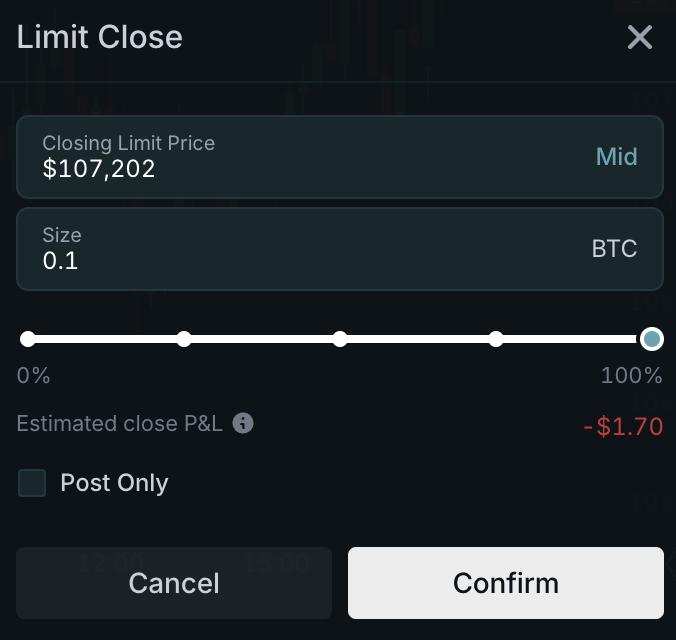
The *Close* button allows you to instantly exit a position partially or in full from the Positions tab. The *Close All* function closes all open positions at once via either market order (default) or limit order at mid-price if selected.
Example of how to close your position with a limit order
**Position History**
Track and review trading activity with transparent historical data through the Position History tab.
Example of order fills including size, fill price, fees, and when the fill occurred
---
# Agent Instructions
This documentation is published with GitBook. GitBook is the documentation platform designed so that both humans and AI agents can read, navigate, and reason over technical content effectively. Learn more at gitbook.com.
## Querying This Documentation
If you need additional information that is not directly available in this page, you can query the documentation by asking a question.
Perform an HTTP GET request on the following URL with the `ask` and `goal` query parameters:
```
GET https://docs.ethereal.trade/trading/perpetual-futures/positions.md?ask=&goal=
```
`ask` is the immediate question: it should be specific, self-contained, and written in natural language.
`goal` is what the user is ultimately trying to achieve, the reason they need the answer. Sharing it helps GitBook give you a better, more relevant answer. A goal is most helpful when it describes the outcome the user wants rather than restating the question. For example, with `ask=how do I create an API token`, a goal like `automate deployments from our CI pipeline` lets GitBook tailor the answer to that use case.
The response will contain a direct answer to the question and relevant excerpts and sources from the documentation.
Use this mechanism when the answer is not explicitly present in the current page, you need clarification or additional context, or you want to retrieve related documentation sections.